EducationSoftwareStrategy.com
StrategyCommunity

Knowledge Base

Product

Community

Knowledge Base

TopicsBrowse ArticlesDeveloper Zone

Product

Download SoftwareProduct DocumentationSecurity Hub

Education

Tutorial VideosSolution GalleryEducation courses

Community

GuidelinesGrandmastersEvents
x_social-icon_white.svglinkedin_social-icon_white.svg
Strategy logoCommunity

© Strategy Inc. All Rights Reserved.

LegalTerms of UsePrivacy Policy
  1. Home
  2. Topics

KB13177: ‘UnexpectedError: Automation error the server threw an exception’ error occurs when starting the Execution Engine inside MicroStrategy Narrowcast Server 9.x Administrator


Community Admin

• Strategy


SYMPTOM:
When a user starts the Execution Engine inside the Strategy Narrowcast Server 9.x Administrator, the following error occurs:
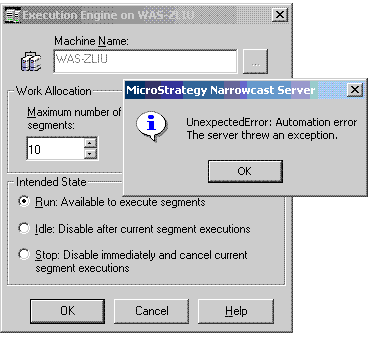
 

ka04W000000OeZyQAK_0EM440000002Bdw.gif

 
UnexpectedError: Automation error
The server threw an exception.
CAUSE:
This error is caused by an incorrect user name or password supplied to the Strategy Execution Engine Service inside the Windows Service Manager.
 
ACTION:
Follow the steps below to resolve this issue:
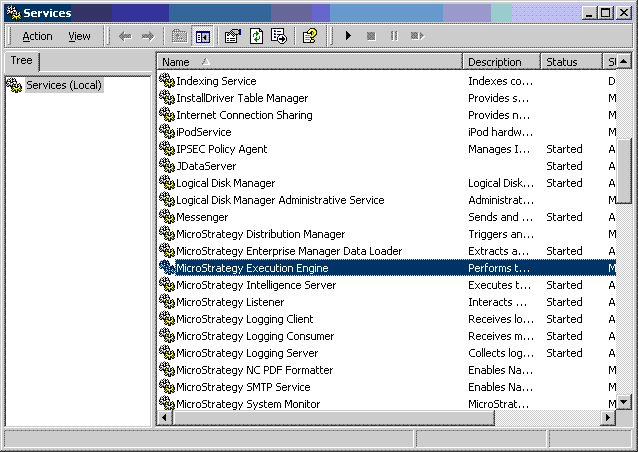
 

  • Open Windows Service Manager and locate the Strategy Execution Engine Service, as shown below:
ka04W000000OeZyQAK_0EM440000002Bds.gif
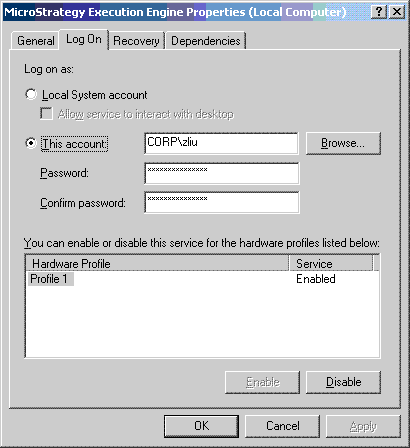
  • Double-click on the service to open the service properties window, and navigates to the 'Log On' tab. Re-enter the user name and password used to start the service. Then apply and save the setting, as shown below:
ka04W000000OeZyQAK_0EM440000002Bdy.gif
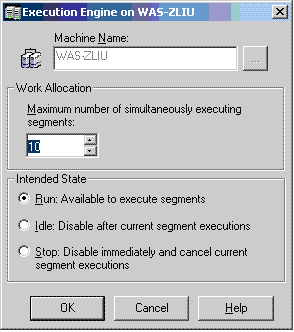
  • Restart the Strategy Execution Engine Service. Now if the user opens Strategy Narrowcast Server 9.x Administrator, the Execution Engine should be started, as shown below:
ka04W000000OeZyQAK_0EM440000002Bdz.gif

13177


Comment

0 comments

Details

Knowledge Article

Published:

June 22, 2017

Last Updated:

June 22, 2017