EducationSoftwareStrategy.com
StrategyCommunity

Knowledge Base

Product

Community

Knowledge Base

TopicsBrowse ArticlesDeveloper Zone

Product

Download SoftwareProduct DocumentationSecurity Hub

Education

Tutorial VideosSolution GalleryEducation courses

Community

GuidelinesGrandmastersEvents
x_social-icon_white.svglinkedin_social-icon_white.svg
Strategy logoCommunity

© Strategy Inc. All Rights Reserved.

LegalTerms of UsePrivacy Policy
  1. Home
  2. Topics

KB13199: How to identify the report or user who created a specific datamart table in MicroStrategy Enterprise Manager


Community Admin

• Strategy


SYMPTOM:
There is currently no functionality in Strategy Enterprise Manager 9.x to deterministically identify the report or the user who executed it to create a specific datamart table.
 
ACTION:
An enhancement request has been logged with the Strategy Technology department to log the information on the user and the report used to create a particular datamart table in Strategy Enterprise Manager 9.x. Contact Strategy Technical Support for the status of the enhancement request.
 
WORKAROUND:
There are two workarounds to locate the report that might have been used to create a particular datamart table:
 

  • Search Tool in Strategy Desktop 9.x:
    One method is to search for datamart reports objects and check the datamart configuration for the table name. The 'Search for Object' tool in Strategy Desktop 9.x can be used to find all objects of the type 'datamart report'.
    For each datamart report, manually check the 'Table name' field in the 'Report Datamart Setup' window, which can be accessed from the report editor Data menu -> Datamart -> Configure Datamart. 


  • Using Strategy Enterprise Manager 9.x:
    Follow the steps below to create a report that will give the names of the datamart reports which have been executed to create a particular table:


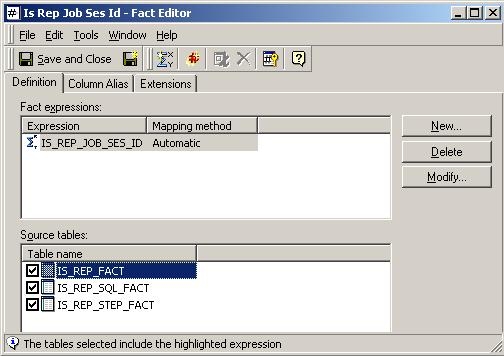
    • Create a fact with the expression mapped to the three tables, as shown in the image below:
ka04W000000OeU5QAK_0EM440000002Bet.jpeg
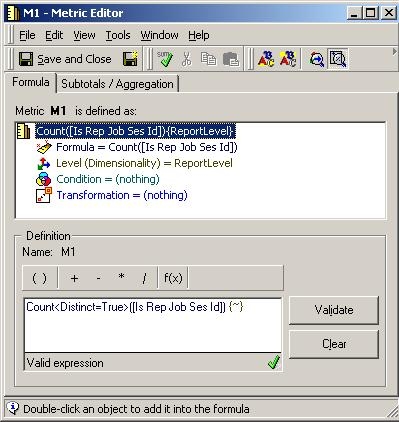
    • Create a metric with the fact created in step 1 with the following expression shown below:
ka04W000000OeU5QAK_0EM440000002Bex.jpeg
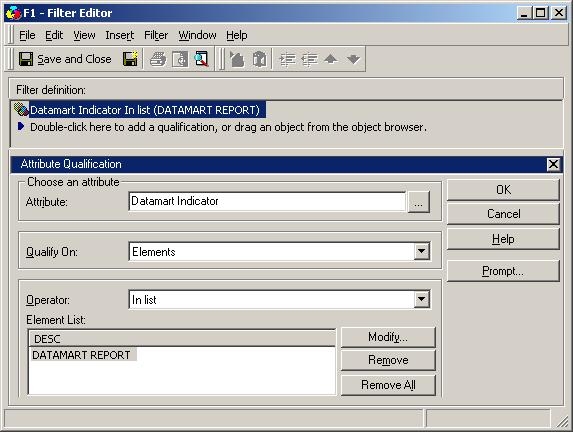
    • Create an attribute element filter object with the attribute 'Datamart Indicator' = 'DATAMART REPORT' as shown below:
ka04W000000OeU5QAK_0EM440000002Bf0.jpeg
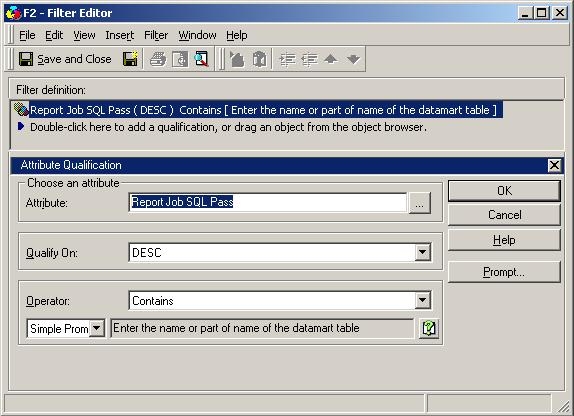
    • Create an attribute element filter object with the attribute 'Report Job SQL Pass' and a simple prompt to input the name (or part of name) of the datamart table, as shown below:
ka04W000000OeU5QAK_0EM440000002Beu.jpeg
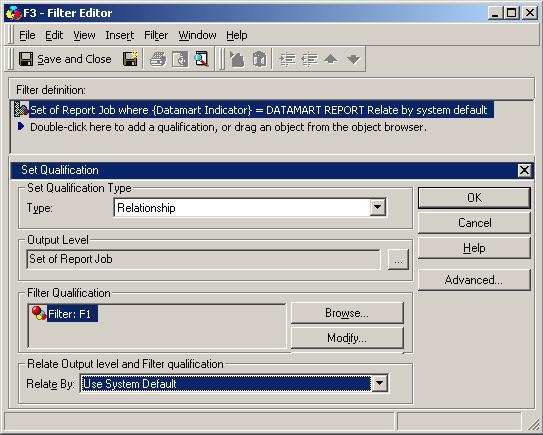
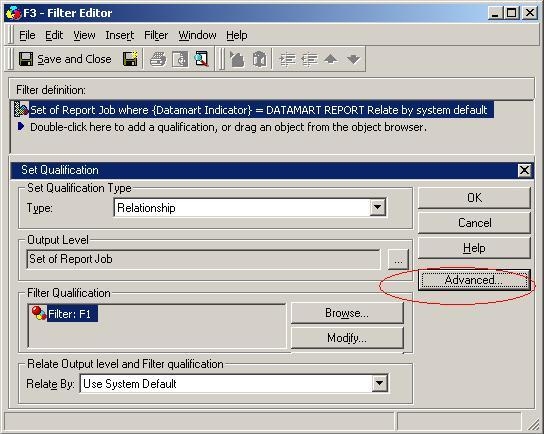
    • Create two relationship filter objects with 'Report Job' as the output level and the two filter objects created in the previous two steps in the filter definition, as shown below:
ka04W000000OeU5QAK_0EM440000002Bf3.jpeg
    •  

      Ensure that the Advanced Option 'Also apply this qualification independently of the relationship filter' is unchecked in both the relationship filters, as shown below:


ka04W000000OeU5QAK_0EM440000002Bev.jpeg
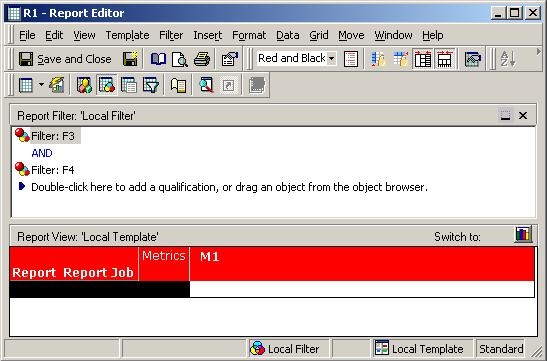
    • Create a report with attributes Report and Report Job and the metric created in step 2 in the grid and the two relationship filters created in the previous step in the report filter, as shown below:
ka04W000000OeU5QAK_0EM440000002Bf4.jpeg
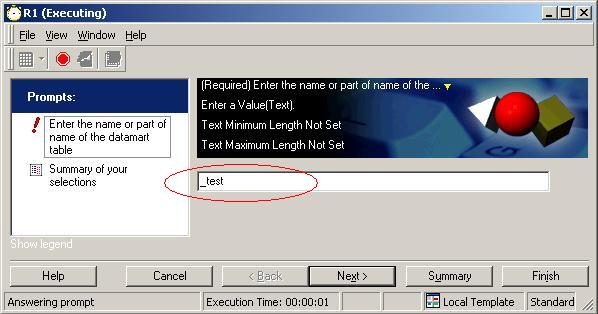
    • Execute the report and answer the simple prompt with name or part of the name of the datamart table for which information is to be obtained, as shown below:
ka04W000000OeU5QAK_0EM440000002Bew.jpeg
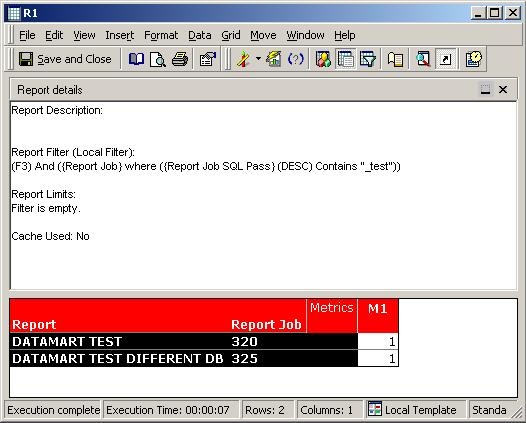
    • The report yields names of all datamart report objects which have been used to create a table with that name, for which information has been collected in Strategy Enterprise Manager 9.x, as shown below. Additional objects may be added to the report as required by the analysis and will be limited by the constraints of the data being collected by Strategy Enterprise Manager 9.x.
ka04W000000OeU5QAK_0EM440000002Bf1.jpeg

NOTE: Both the workarounds mentioned above are not exact methods as they will not be useful if the name of the datamart table or the report has been changed, if the report is no longer setup to be a datamart report, or if it has been deleted.


Comment

0 comments

Details

Knowledge Article

Published:

June 9, 2017

Last Updated:

June 9, 2017