Managed objects are those objects used in Freeform SQL reports that are managed by the Strategy environment, meaning:
The option to Delete unused managed objects allows a Strategy Administrator to force a search and delete of those managed objects which no longer are in use by the project (no longer have dependants).
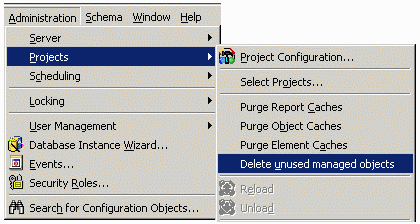
The Delete unused managed objects option is found under the Administration menu -> Projects in Strategy Developer, as shown below:
Note: When you delete a Freeform SQL report, all the associated managed attributes and metrics used in the report are not deleted automatically. You must use the Search for Objects feature to search for the object first and then manually delete it by right-clicking its name in the search result.
Managed attributes and metrics in Freeform SQL are NOT deleted even if you use the Delete Unused Managed Objects feature. Again, you must use the Search for Objects function to make the deletion.
