EducationSoftwareStrategy.com
StrategyCommunity

Knowledge Base

Product

Community

Knowledge Base

TopicsBrowse ArticlesDeveloper Zone

Product

Download SoftwareProduct DocumentationSecurity Hub

Education

Tutorial VideosSolution GalleryEducation courses

Community

GuidelinesGrandmastersEvents
x_social-icon_white.svglinkedin_social-icon_white.svg
Strategy logoCommunity

© Strategy Inc. All Rights Reserved.

LegalTerms of UsePrivacy Policy
  1. Home
  2. Topics

KB13252: How to trigger services automatically in MicroStrategy Narrowcast Server 9.x - 10.x


Community Admin

• Strategy


This article describes how to automatically trigger Narrowcast services using Command Manager scripts

The following procedure describes how to write a script for Strategy Command Manager 9.x - 10.x that will trigger a number of services to execute sequentially:
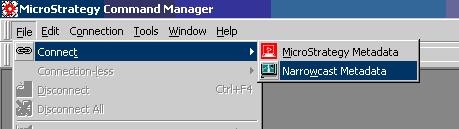
  • Open Strategy Command Manager.
  • Open a connection to Strategy Narrowcast Server metadata by choosing File -> Connect -> Narrowcast Metadata, as shown below:
ka04W000000OhEuQAK_0EM440000002BeX.jpeg
  • Log in using the Administrator account.
  • Use the following syntax in the script:
    
    TRIGGER SERVICE "Service Name" IN FOLDER "folder containing service";

    For example:
    
    TRIGGER SERVICE "Service 2" IN FOLDER "Applications/My First Application/Services/";

  • Insert as many triggers as there are services needed to be executed:
    
    TRIGGER SERVICE "Service 2" IN FOLDER "Applications/My First Application/Services/";
    
    TRIGGER SERVICE "PDF Service" IN FOLDER "Applications/My First Application/Services/";
    
    TRIGGER SERVICE "Excel Service" IN FOLDER "Applications/My First Application/Services/";


The script will trigger the services to execute. Each service will be sent to execute in succession (i.e. the second service will be triggered immediately after the first service is triggered -- it will not wait until the execution of the first service is complete). If there is any problem with a trigger, it will be displayed in the script window.


Comment

0 comments

Details

Knowledge Article

Published:

May 30, 2017

Last Updated:

May 30, 2017