EducationSoftwareStrategy.com
StrategyCommunity

Knowledge Base

Product

Community

Knowledge Base

TopicsBrowse ArticlesDeveloper Zone

Product

Download SoftwareProduct DocumentationSecurity Hub

Education

Tutorial VideosSolution GalleryEducation courses

Community

GuidelinesGrandmastersEvents
x_social-icon_white.svglinkedin_social-icon_white.svg
Strategy logoCommunity

© Strategy Inc. All Rights Reserved.

LegalTerms of UsePrivacy Policy
  1. Home
  2. Topics

KB13271: How to generate a data sample from a report result that has SQL Server as a data warehouse in MicroStrategy Engine


Community Admin

• Strategy


This article explains how to modify SQL to select random rows from a report result, which has SQL Server as a data warehouse in MicroStrategy Engine.

This article explains how to modify SQL to select random rows from a report result, which has SQL Server as a data warehouse in Strategy Engine.
 
For example, the following SQL statement example can be used for SQL Server:
 
SELECT TOP 10 column FROM table ORDER BY NEWID()
In order to modify SQL generation in Strategy Desktop 8.x, follow the steps below:
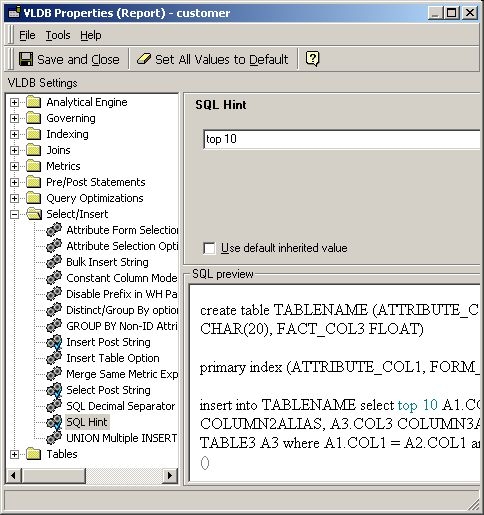
 

  • Go to the VLDB properties from the Data menu in the Report Editor and choose Select/Insert to set a value for SQL Hint.
  • Type 'top 10', for an example, and notice Select statement is changed, as shown below:
ka04W000000OhB1QAK_0EM440000002FXY.jpeg
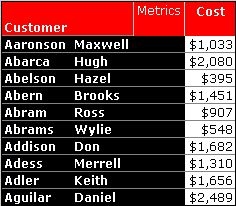
  • The report will return the top 10 customers in alphabetical order, as shown below:
ka04W000000OhB1QAK_0EM440000002FXb.jpeg
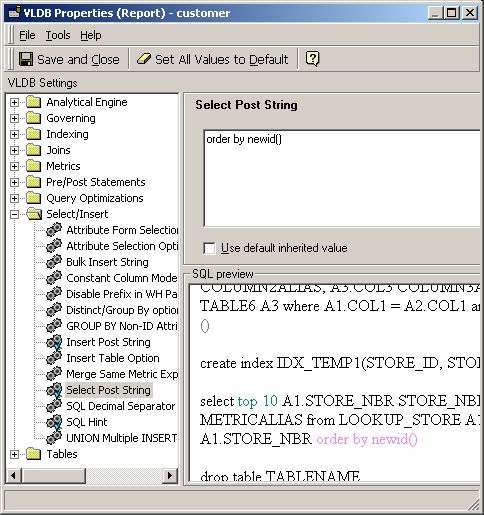
  • For random top 10, type 'order by newid()' in the 'Select Post String' box. It will modify SQL as shown below:
ka04W000000OhB1QAK_0EM440000002FXZ.jpeg
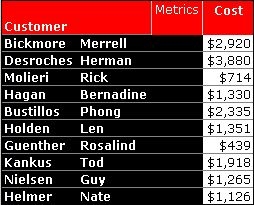
  • The report result now display 10 random customer names, as shown below:
ka04W000000OhB1QAK_0EM440000002FXa.jpeg

Comment

0 comments

Details

Knowledge Article

Published:

June 1, 2017

Last Updated:

June 1, 2017