Intermediate tables may be created by the Strategy SQL Generation Engine 10.x against the warehouse to facilitate multi-pass SQL. For creation of intermediate tables, the VLDB setting 'Intermediate Table Type' has to be either 'Permanent Table' or 'True Temporary Table'. By default, these tables are created in the same location as warehouse tables. However, in Strategy SQL Generation Engine 10.x, there is an option to assign a prefix and route the intermediate tables that have been created as permanent tables to a different location. This is achieved by a VLDB setting called 'Table Prefix'. This offers administrators the ability to better handle and manage these tables. Refer to the following Knowledge Base document for details on this option:
KB4000-7X0-0708: How to specify a prefix for the intermediate tables created by the Strategy SQL Generation Engine
NOTE: The same Data Source Name (DSN) as the warehouse is used here. This option only provides a prefix to route the intermediate tables to the different database/location within the same database instance.
In SQL Server, users can access tables in different databases (but within the same SQL Server instance), by suitably using prefixes. In SQL Server, table specification goes by databasename.ownername.tablename. So the prefix that can be used for table access in a different database is databasename.ownername.
For example, consider that the warehouse database in SQL Server is called WH1. User creates a new database called TEST as a system owner (dbo) in the same SQL Server instance, to which he/she intends to route the intermediate tables. As an example, let's say there is a table called TEST1 in the database TEST. If the user connects to the DSN pointing to WH1 (through a tool such as Strategy Test ODBC or SQL Server Query Analyzer) and runs the query, SELECT * FROM TEST1, the following error is returned:
Invalid object name 'TEST1'.
However if the same query (SELECT * FROM TEST1) is executed after prefixing it with databasename.ownername (as below), it runs correctly:
SELECT * FROM TEST.dbo.TEST1
As stated earlier, by default, the intermediate tables are created in the same location as the warehouse tables (WH1, in the above example). The SQL generated for creation of intermediate table is as follows:
create table ZZTXZ001LH0MD000 (
QUARTER_ID SMALLINT,
CALL_CTR_ID TINYINT,
WJXBFS1 FLOAT)
In order to route the intermediate tables to TEST1, the prefix used for SQL Server should be TEST.dbo. That is, the 'Table Prefix' setting should be as follows:
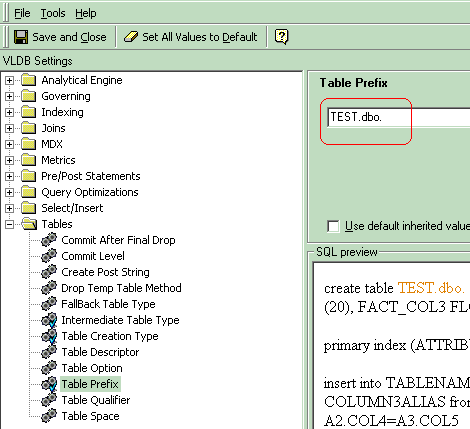
The generated SQL for creation of intermediate table will now be as follows:
create table TEST.dbo.ZZTXZ001LOFMD000 (
QUARTER_ID SMALLINT,
CALL_CTR_ID TINYINT,
WJXBFS1 FLOAT)
NOTE: If the 'Intermediate Table Type' setting is set to 'True Temporary Table', the 'Table Prefix' setting will not apply. True temporary tables in SQL Server are always created in the tempdb database.
Third Party Software Installation:
WARNING:
The third-party product(s) discussed in this technical note is manufactured by vendors independent of Strategy. Strategy makes no warranty, express, implied or otherwise, regarding this product, including its performance or reliability.
13284
