EducationSoftwareStrategy.com
StrategyCommunity

Knowledge Base

Product

Community

Knowledge Base

TopicsBrowse ArticlesDeveloper Zone

Product

Download SoftwareProduct DocumentationSecurity Hub

Education

Tutorial VideosSolution GalleryEducation courses

Community

GuidelinesGrandmastersEvents
x_social-icon_white.svglinkedin_social-icon_white.svg
Strategy logoCommunity

© Strategy Inc. All Rights Reserved.

LegalTerms of UsePrivacy Policy
  1. Home
  2. Topics

KB13293: How to obtain the process ID (PID) of the MicroStrategy Intelligence Server Universal process running on Unix/Linux.


Community Admin

• Strategy


How to obtain the process ID (PID) of the MicroStrategy Intelligence Server Universal 9.x and 10.x process running on Unix/Linux.

The Process ID (PID) of the Strategy Intelligence Server Universal  process running on Unix/Linux can be obtained in one of the following ways:
 

  • Run the following command:
    ps -ef ¦ grep "MSTRSvr"
  • Note that the character before grep is the broken pipe character on the keyboard. The results will appear as shown below. In this example, the PID is 1806402
     
    # ps -ef ¦ grep MSTRSvr
    tester 1806402 1 0 Aug 24 - 80:49 /home/tester/AIX/bin/MSTRSvr -w /home/tester/BIN/AIX -t status-iserver.xml /home/tester/AIX/lib/libMSTRSvr2.a -n CastorServer
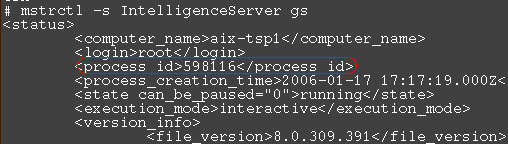
  • Alternatively, run the following command from the 'bin' folder in the Strategy home folder, and check the process_id field:
    ./mstrctl -s IntelligenceServer gs
ka04W000000Of6sQAC_0EM440000002Beo.gif

Third Party Software Installation:
WARNING:
The third-party product(s) discussed in this technical note is manufactured by vendors independent of Strategy. Strategy makes no warranty, express, implied or otherwise, regarding this product, including its performance or reliability.


Comment

0 comments

Details

Knowledge Article

Published:

June 3, 2017

Last Updated:

June 3, 2017