EducationSoftwareStrategy.com
StrategyCommunity

Knowledge Base

Product

Community

Knowledge Base

TopicsBrowse ArticlesDeveloper Zone

Product

Download SoftwareProduct DocumentationSecurity Hub

Education

Tutorial VideosSolution GalleryEducation courses

Community

GuidelinesGrandmastersEvents
x_social-icon_white.svglinkedin_social-icon_white.svg
Strategy logoCommunity

© Strategy Inc. All Rights Reserved.

LegalTerms of UsePrivacy Policy
  1. Home
  2. Topics

KB13303: How to set up connectivity to Essbase and Microsoft Analysis Services (MSAS) in MicroStrategy 9.x and later


Community Admin

• Strategy


How to set up connectivity to Essbase and Microsoft Analysis Services (MSAS) in MicroStrategy 9.x and later

XML for Analysis is a SOAP-based interface for exposing OLAP and Data Mining data sources as Web services. Simple Object Access Protocol (SOAP)is a standard protocol that provides a packaging structure for transporting XML messages over lower level protocols like HTTP or SMTP.
 
To use Hyperion from Strategy, customers will need to follow the steps below:
 

  • Create a database instance that points to Hyperion Essbase by selecting Hyperion Essbase as the Database connection type.
ka04W000000OhGxQAK_0EM440000002Bed.jpeg
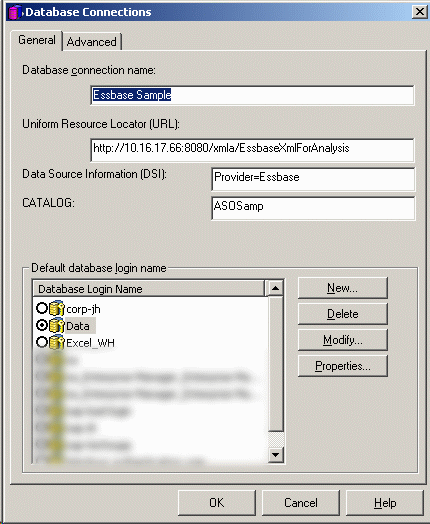
  • In the database connection window enter the information described below:
    • URL: This is the URL of the XMLA Provider that was configured for HTTP access. For example, http://fully-qualified-machinename:8080/xmla/EssbaseXmlForAnalysis. The fully-qualified-machinename is usually of the form machine.domain.company.com. For Essbase the URL is likely to be case sensitive.
    • DSI: The DataSourceInfo (DSI) value is of the form: Provider=Essbase;Data source=. When the user enters the DataSourceInfo (DSI) it should be in the form {Provider=Essbase;Data source=}. The value is split between the DSI setting and an additional connection string parameters setting.
    • Catalog: The Essbase Catalog value is the Essbase Application containing the database you want to work with in Strategy. Use the Essbase Administration Console to view the applications and databases available on the server. A cube in XMLA is a database in Essbase.
ka04W000000OhGxQAK_0EM440000002Bes.gif
  • Once this is set up at the Web Server, any username and password can be specified for the login in Strategy.
     
    If the option to "Use network id box (Windows authentication)" is selected in the Database Login dialog box users will be prompted with a warning which can be ignored.
ka04W000000OhGxQAK_0EM440000002Bef.jpeg

Customers wishing to establish connectivity to Microsoft Analysis Services would need to choose Microsoft Analysis Services in the Database Connection type instead of Hyperion Essbase as shown below.
 

ka04W000000OhGxQAK_0EM440000002Bec.jpeg


Comment

0 comments

Details

Knowledge Article

Published:

May 27, 2017

Last Updated:

May 27, 2017