SYMPTOM:
In the case of more than one smart compound metric on a report where the metric join type is set to 'outer join,' users may find that one or more outer joins that are expected in the SQL may be converted to inner joins in Strategy SQL Generation Engine. This may produce incorrect report results.
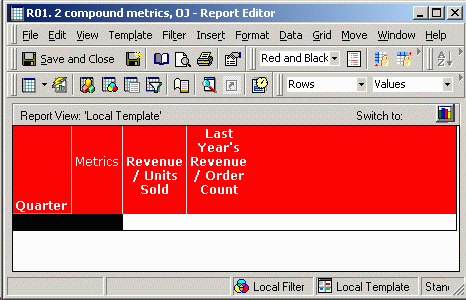
For example, consider the following report in the Strategy Tutorial project:
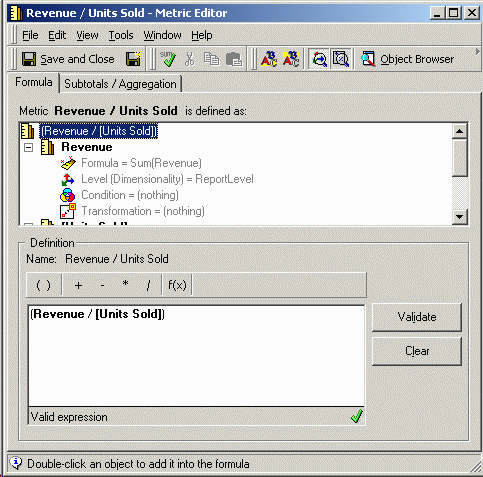
The two metrics 'Revenue / Units Sold' and 'Last Year's Revenue / Order Count' are defined as follows:
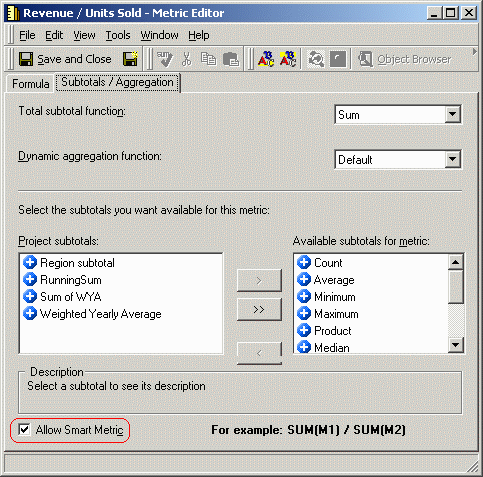
In addition, both metrics have the 'Allow Smart Metric' flag enabled, as shown below:
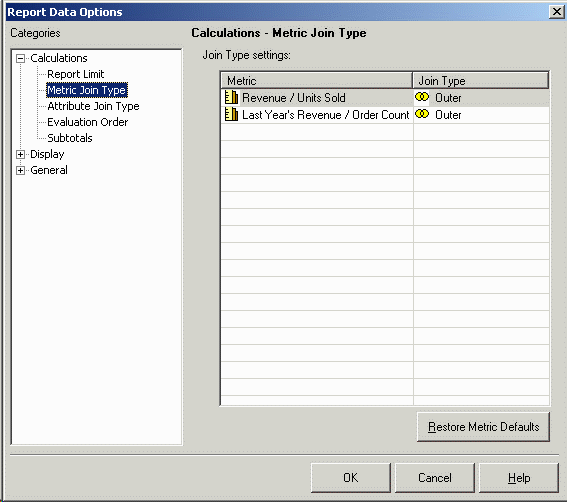
Finally, the report defines outer joins between both metrics. This dialog may be reached in the report editor by going to the Data menu and choosing 'Report Data Options', as shown below:
When SQL is generated for the report, it is expected that the metric calculation passes (#ZZMD00, #ZZMD01, #ZZMD02) will be joined with a full outer join. Instead, inner joins appear in each case, as shown below:
select a12.QUARTER_ID QUARTER_ID,
count(a11.ORDER_ID) WJXBFS1
into #ZZMD00
from ORDER_FACT a11
join LU_DAY a12
on (a11.ORDER_DATE = a12.DAY_DATE)
group by a12.QUARTER_ID
select a11.QUARTER_ID QUARTER_ID,
sum(a11.TOT_DOLLAR_SALES) WJXBFS1,
sum(a11.TOT_UNIT_SALES) WJXBFS2
into #ZZMD01
from QTR_CATEGORY_SLS a11
group by a11.QUARTER_ID
select a12.QUARTER_ID QUARTER_ID,
sum(a11.TOT_DOLLAR_SALES) WJXBFS1
into #ZZMD02
from QTR_CATEGORY_SLS a11
join LU_QUARTER a12
on (a11.QUARTER_ID = a12.LY_QUARTER_ID)
group by a12.QUARTER_ID
select pa1.QUARTER_ID QUARTER_ID,
a11.QUARTER_DESC QUARTER_DESC,
pa1.WJXBFS1 WJXBFS1,
pa2.WJXBFS1 WJXBFS2,
pa2.WJXBFS2 WJXBFS3,
pa3.WJXBFS1 WJXBFS4
from #ZZMD00 pa1
join #ZZMD01 pa2
on (pa1.QUARTER_ID = pa2.QUARTER_ID)
join #ZZMD02 pa3
on (pa1.QUARTER_ID = pa3.QUARTER_ID)
join LU_QUARTER a11
on (pa1.QUARTER_ID = a11.QUARTER_ID)
CAUSE:
This problem is the result of the 'Formula Join Type' setting in the smart compound metric definitions being set to 'inner join.'
Evaluation of smart compound metrics differs from non-smart metrics:
The Metric Outer Join setting defined in Report Data Options controls how the final results of both simple and compound metrics will be joined in SQL. In the case of a pair of smart compound metrics, however, it is not the final metric results that are being joined in the SQL. It is rather the component metrics that are joined.
The setting to control the join between components of a compound metric is called 'Formula Join Type,' and is not accessible from the report editor. The setting exists in the metric editor, under the Tools menu -> Advanced Settings -> Formula Join Type. The Report Data Options setting does not affect the component metric joins.
ACTION:
Several possible resolutions are available, depending on the circumstance:
See also the following Strategy Knowledge Base article for a summary of the applicable metric outer join settings:
KB11111 - When are the metric join type and formula join type applicable in Strategy
