If the loading of a project takes a long time, is it possible to improve the speed of this operation?
When the server loads a project, it retrieves a lot of information related to the schema objects from the metadata. The time taken for a project to be loaded is directly proportional to the number of objects in the project schema (attributes, facts etc.) and the response time for the metadata database and network layer. Some of the retrieved information may be persisted into the server object cache which makes access to these objects faster (eliminating future trips to the database).
The 'load at the startup' design for schema objects usually speeds up how subsequent job requests are handled, because a lot of the information is already cached in the server side. However, there is still a way to optimize the 'startup loading' process.
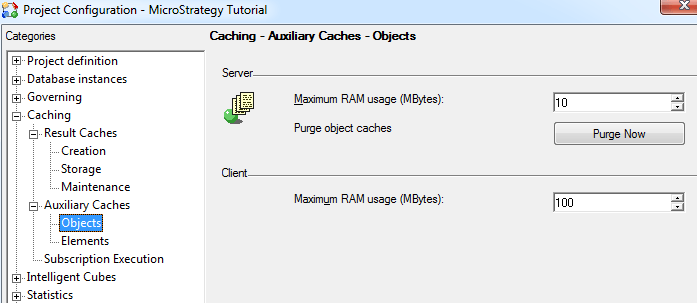
For a project that has a large schema object, the project loading speed may suffer if the maximum memory for object cache setting (as shown below) is not big enough. In this case, the following warning message appears in the server log file:
DSSSQLEngine: WARNING: Object cache MaxCacheCount setting (205) is too small relative to estimated schema size (793). Project loading performance may suffer.
The MaxCacheCount setting (205) is calculated based on dividing the maximum Ram usage of object cache (1028 in this example) by five. Typically, the MaxCacheCount should be at least twice the size of the estimated schema size (793).
The MaxCacheCount must be at least twice the size of the estimated schema: 793*2=1586. The maximum Ram usage of object cache is calculated by multiplying the above number by five, resulting in 7930K to be input into the Project Configuration setting.
It is not possible to estimate the schema size through any simple analysis of the project. There is no need to tamper with the object cache RAM limit unless users are experiencing slowness in the project loading and see the Warning message in the DSS Errors.log. However, if users ever encounter this warning message, then the message itself will include an estimated schema size.
The example above can be summarized by ensuring that the project loading is optimized by making the max Ram usage of object cache 10 times greater than the estimated schema size.
In addition to the above setting, another major reason for a slow project load could be any additional traces or logs that have been turned on for diagnostic purposes.
Turn off the trace files (from diagnostics configuration in the Developer) to ensure the project is loading without logging any unnecessary information that can slow down the performance.
KB13390
