EducationSoftwareStrategy.com
StrategyCommunity

Knowledge Base

Product

Community

Knowledge Base

TopicsBrowse ArticlesDeveloper Zone

Product

Download SoftwareProduct DocumentationSecurity Hub

Education

Tutorial VideosSolution GalleryEducation courses

Community

GuidelinesGrandmastersEvents
x_social-icon_white.svglinkedin_social-icon_white.svg
Strategy logoCommunity

© Strategy Inc. All Rights Reserved.

LegalTerms of UsePrivacy Policy
  1. Home
  2. Topics

KB13440: When a user inputs an integer for a value prompt, the integer is displayed as a number with one decimal point in SQL view of a report in MicroStrategy Developer


Stefan Zepeda

Salesforce Solutions Architect • Strategy


When a user inputs an integer for a value prompt, the integer is displayed as a number with one decimal point in the SQL view of a report in MicroStrategy Developer.

SYMPTOM:
When a user inputs an integer for a value prompt, the integer is displayed as a number with one decimal point in the SQL view of a report in Strategy Developer.
 
STEPS TO REPRODUCE:
Follow the steps below to reproduce this issue:
  • Create a value prompt and, choose Number type.
  • Create a metric using the value prompt (ex: rev + value prompt.)
  • Put the metric in report and execute the report.
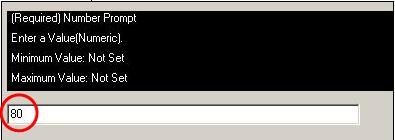
  • Input 80 as the value when being prompted, as shown below:
ka0PW0000002ukTYAQ_0EM440000002FXx.jpeg
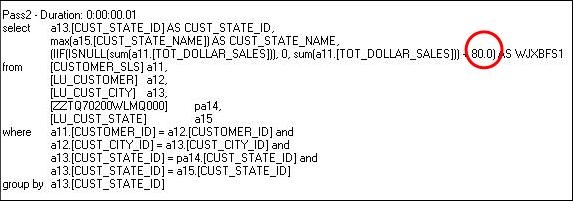
  • The value is showing with one decimal digit (for example, the user input 80, the value in SQL shows 80.0) as shown below:
ka0PW0000002ukTYAQ_0EM440000002FXz.jpeg

CAUSE:
This is working as designed.
 
ACTION:
Cast the value as an integer to force the SQL to calculate it as an integer. Cast statements may vary between databases. Consult your DBA or product manuals for the particular database.


Comment

0 comments

Details

Knowledge Article

Published:

June 12, 2017

Last Updated:

August 7, 2024