EducationSoftwareStrategy.com
StrategyCommunity

Knowledge Base

Product

Community

Knowledge Base

TopicsBrowse ArticlesDeveloper Zone

Product

Download SoftwareProduct DocumentationSecurity Hub

Education

Tutorial VideosSolution GalleryEducation courses

Community

GuidelinesGrandmastersEvents
x_social-icon_white.svglinkedin_social-icon_white.svg
Strategy logoCommunity

© Strategy Inc. All Rights Reserved.

LegalTerms of UsePrivacy Policy
  1. Home
  2. Topics

KB13460: How to disassociate dependency between a prompt object and a Report Services document after the prompt has been removed from the data set report in MicroStrategy Developer 10.x


Stefan Zepeda

Salesforce Solutions Architect • Strategy


A user is not able to delete a prompt object from a Report Services document even though the prompt has been removed from the data set report in MicroStrategy Developer 10.x

SYMPTOM:
A user is not able to delete a prompt object from a Report Services document even though the prompt has been removed from the data set report in Strategy Developer 10.x
 
STEPS TO REPRODUCE:
Follow the steps below to reproduce this issue:
  • Create a prompt (for example, choose an element from customer state attribute) and save it as P1.
  • Create a report (for example, customer state, customer city, revenue) and add P1 into report filter. Save the report as R1.
  • Create a Report Services document using R1 as the dataset, drag the grid into the detail header, and execute the document in PDF view. Save the document as D1.
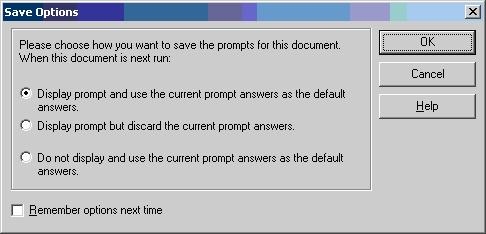
  • When 'Save Options' appear, choose the first option, as shown below:
ka02R000000kc3CQAQ_0EM440000002FXd.jpeg
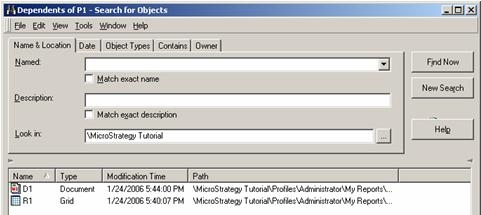
  • Right click on P1 and select 'Search for Dependants.' Both R1 and D1 are listed as dependents as shown below:
ka02R000000kc3CQAQ_0EM440000002FXf.jpeg
  • Edit R1 and remove the prompt from report filter. Save and close the report.
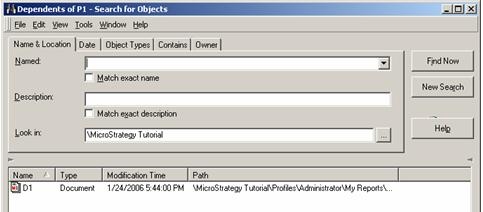
  • Now check the dependants again for P1. R1 should no longer appear, but D1 is still the dependent of P1, as shown below, and this dependency will not allow the user to delete P1:
ka02R000000kc3CQAQ_0EM440000002FXh.jpeg

CAUSE:
Users cannot remove the prompt object because the system believes the Report Services document is still depending on the prompt.
 
ACTION:
Disassociate the dependency between the prompt object and the Report Services document by following the steps below:
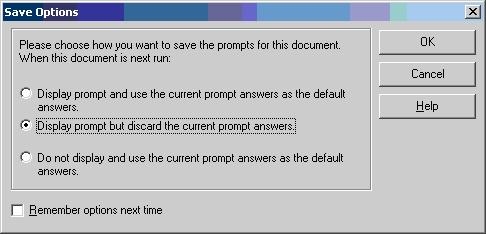
  • Open D1 in edit view, click on Save to get to the Save Options, and click the second option, as shown below:
ka02R000000kc3CQAQ_0EM440000002FXj.jpeg
  • Now check the dependents for P1 and there should not be any dependent.
  • Delete P1.

Comment

0 comments

Details

Knowledge Article

Published:

May 31, 2017

Last Updated:

May 31, 2017