EducationSoftwareStrategy.com
StrategyCommunity

Knowledge Base

Product

Community

Knowledge Base

TopicsBrowse ArticlesDeveloper Zone

Product

Download SoftwareProduct DocumentationSecurity Hub

Education

Tutorial VideosSolution GalleryEducation courses

Community

GuidelinesGrandmastersEvents
x_social-icon_white.svglinkedin_social-icon_white.svg
Strategy logoCommunity

© Strategy Inc. All Rights Reserved.

LegalTerms of UsePrivacy Policy
  1. Home
  2. Topics

KB13466: How to set defaults to different objects and editors in MicroStrategy Developer 10.x


Stefan Zepeda

Salesforce Solutions Architect • Strategy


This Technical Note describes how users can set defaults to different objects and editors in MicroStrategy Developer 10.x

Some users would like to set default values and properties for different objects and editors in Strategy Desktop.
 
Common questions:

  1. How do I set the row and column widths on grids to a default value before a report is created?
  2. How do I set the Dynamic Aggregation function to SUM as default for a metric?
  3. How do I set a default Auto Style for grids on Report Services documents?

A solution to many such questions is to create templates with the desired properties and values and place them in the Object templates folder.
 
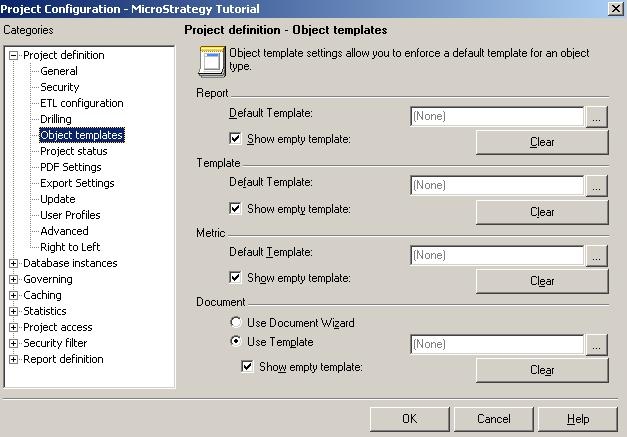
Also, each editor can be defaulted to an existing template for a given project when it is opened. This can be set in the Project Configuration editor under Project Definition -> Object Templates, as shown below:
ka02R000000kcV9QAI_0EM440000002FYB.jpeg

 
The Object Templates folder is a hidden folder. Refer to the following Strategy Knowledge Base technical note for information on how to view the Object Templates folder:
KB19828 (KB5700-8X-3351): How to display hidden and invisible folders/objects in Strategy Developer 10.x
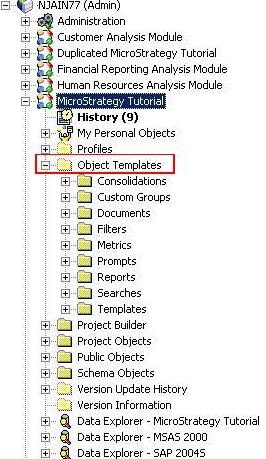
Once the hidden objects are enabled, the Object Templates folder can be seen within a project as below:
ka02R000000kcV9QAI_0EM440000002FYA.jpeg

Comment

0 comments

Details

Knowledge Article

Published:

April 16, 2017

Last Updated:

April 16, 2017