SYMPTOM:
The user receives the following error message when accessing one of the Administration monitors (report caches, schedules, jobs, etc.) in Strategy Developer 10.X:
You are trying to retrieve objects. This amount exceeds the pre-set limit of 1000. Only the first 1000 will be displayed.
CAUSE:
The default settings of Strategy Developer 10.X set a display limit of 1000 objects in all of the Administration monitors.
ACTION:
To increase this limit, go to Tools -> Preferences and choose the Browsing tab, as shown below:
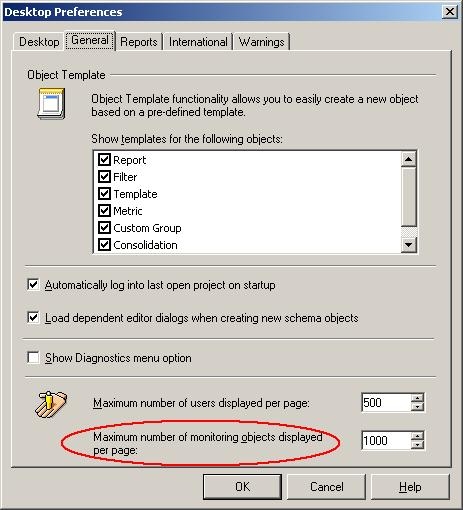
The 'Maximum number of monitoring objects displayed per page' setting can be raised or lowered as desired. Bear in mind that there is a hard coded 100,000 object limit of report caches in Strategy Desktop.
