EducationSoftwareStrategy.com
StrategyCommunity

Knowledge Base

Product

Community

Knowledge Base

TopicsBrowse ArticlesDeveloper Zone

Product

Download SoftwareProduct DocumentationSecurity Hub

Education

Tutorial VideosSolution GalleryEducation courses

Community

GuidelinesGrandmastersEvents
x_social-icon_white.svglinkedin_social-icon_white.svg
Strategy logoCommunity

© Strategy Inc. All Rights Reserved.

LegalTerms of UsePrivacy Policy
  1. Home
  2. Topics

KB13513: How does the Global Optimization feature merge related SQL passes in MicroStrategy SQL Generation Engine 9.x-10.x?


Community Admin

• Strategy


In general, the Strategy SQL Generation Engine will attempt to calculate all metrics on a report that are at the same dimensionality level that use the same filtering conditions within a single pass. This applies to scenarios where the attributes in the SELECT clause are the same, and the FROM, WHERE and GROUP BY clauses are identical.


Total6Count6Average1Minimum1Maximum1Product1Median1Mode1Standard Deviation0Variance0VGeometric Mean1Step 1: Calculate metric values.Step 1: Calculate metric values.Step 2: Calculate compound metric values.Step 2: Calculate subtotal values.Step 3: Calculate subtotal values.Step 3: Calculate compound metric values.At Step 3, each subtotal value is a sum of the rows above it. So, the subtotal of the 'Profit/Revenue' metric is (Year2002 ) + (Year2003 ). At Step 3, each compound metric value is a division of the rows to the left of it. So, the subtotal of the 'Profit/Revenue' metric is (Subtotal of ) / (Subtotal of ). Report Data Options: Default checkedSubtotal
Compound Metrics
Consolidation
Metric LimitCompound Metrics
Consolidation
Metric Limit
SubtotalReport Data Options: Default uncheckedOrder given by user, OR:
Compound Metrics
Consolidation
Metric Limit
SubtotalOrder given by user, OR:
Compound Metrics
Consolidation
Metric Limit
SubtotalVariableStrategy Meaning"Reserved" Query Band!dDate from Intelligence ServerStartTime (combine with !t)!tTimestamp from Intelligence ServerStartTime (combine with !d)!uStrategy user nameClientUser!pProject nameSource!zProject ID (16-digit hex ID) !oReport nameAction!rReport ID (16-digit hex ID) !jIntelligence Server job IDJobID!sUser Session ID (16-digit hex ID) VLDB CategoryVLDB Property SettingValuePre/Post StatementsReport Pre StatementTeradata Reserved Query Band names SET QUERY_BAND ='ApplicationName=Strategy; ClientUser=!u;Source=!p;Action=!o;StartTime=!dT!t; JobID=!j;sess_id=!s;proj_id=!z;report_guid=!r;' FOR SESSION;Pre/Post StatementsCleanup Post StatementSET QUERY_BAND = NONE FOR SESSION;VLDB CategoryVLDB Property SettingValuePre/Post StatementsElement Browsing Pre StatementTeradata reserved Query Band names: SET QUERY_BAND = ‘Source=!p;; SQLTYPE=ELEMENTBROWSE;; ClientUser=!u;;JobID=!j;;’ FOR SESSION;;Pre/Post StatementsElement Browsing Post StatementSET QUERY_BAND = NONE FOR SESSION;;InefficientEfficientselect   Attribute,


Total6Count6Average1Minimum1Maximum1Product1Median1Mode1Standard Deviation0Variance0VGeometric Mean1Step 1: Calculate metric values.Step 1: Calculate metric values.Step 2: Calculate compound metric values.Step 2: Calculate subtotal values.Step 3: Calculate subtotal values.Step 3: Calculate compound metric values.At Step 3, each subtotal value is a sum of the rows above it. So, the subtotal of the 'Profit/Revenue' metric is (Year2002 ) + (Year2003 ). At Step 3, each compound metric value is a division of the rows to the left of it. So, the subtotal of the 'Profit/Revenue' metric is (Subtotal of ) / (Subtotal of ). Report Data Options: Default checkedSubtotal
Compound Metrics
Consolidation
Metric LimitCompound Metrics
Consolidation
Metric Limit
SubtotalReport Data Options: Default uncheckedOrder given by user, OR:
Compound Metrics
Consolidation
Metric Limit
SubtotalOrder given by user, OR:
Compound Metrics
Consolidation
Metric Limit
SubtotalVariableStrategy Meaning"Reserved" Query Band!dDate from Intelligence ServerStartTime (combine with !t)!tTimestamp from Intelligence ServerStartTime (combine with !d)!uStrategy user nameClientUser!pProject nameSource!zProject ID (16-digit hex ID) !oReport nameAction!rReport ID (16-digit hex ID) !jIntelligence Server job IDJobID!sUser Session ID (16-digit hex ID) VLDB CategoryVLDB Property SettingValuePre/Post StatementsReport Pre StatementTeradata Reserved Query Band names SET QUERY_BAND ='ApplicationName=Strategy; ClientUser=!u;Source=!p;Action=!o;StartTime=!dT!t; JobID=!j;sess_id=!s;proj_id=!z;report_guid=!r;' FOR SESSION;Pre/Post StatementsCleanup Post StatementSET QUERY_BAND = NONE FOR SESSION;VLDB CategoryVLDB Property SettingValuePre/Post StatementsElement Browsing Pre StatementTeradata reserved Query Band names: SET QUERY_BAND = ‘Source=!p;; SQLTYPE=ELEMENTBROWSE;; ClientUser=!u;;JobID=!j;;’ FOR SESSION;;Pre/Post StatementsElement Browsing Post StatementSET QUERY_BAND = NONE FOR SESSION;;InefficientEfficientselect   Attribute,

   Sum(Fact1)

from    Table1

where AttributeB in (Element1)

group by AttributeA

 
select   Attribute,


   Sum(Fact2)

from    Table1

where AttributeB in (Element1)

group by AttributeA
select   Attribute,

   Sum(Fact1),

   Sum(Fact2)

from    Table1

where AttributeB in (Element1)

group by AttributeA

 
Strategy normally generates this SQL.


Cases exist where this type of optimization does not take place. For instance, if one metric uses a standard aggregation function and another metric is a count of an attribute, two SQL passes are rendered even if the metrics could be calculated in the same pass.
 
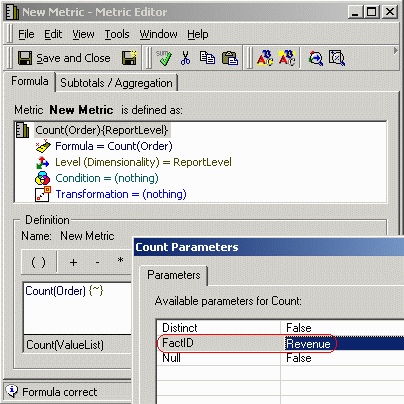
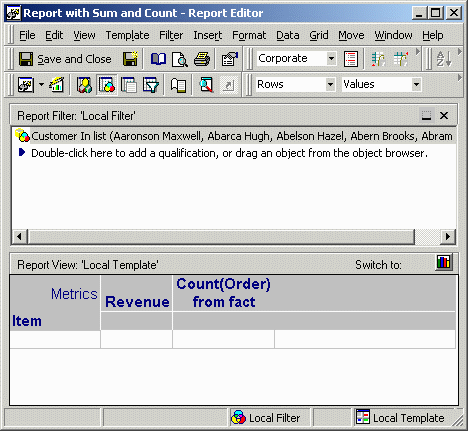
For instance, consider a metric and a report defined as follows:
 

ka04W000000OcCdQAK_0EM440000002FYW.gif

 
NOTE: The Count function specifies a FactID so that the count will be performed over a fact table, rather than reverting to the Order attribute's lookup table.
 

ka04W000000OcCdQAK_0EM440000002FYZ.gif

 
Without Global Optimization, this report generates the following SQL:
 
select   a11.ITEM_ID ITEM_ID,
   sum((a11.QTY_SOLD * (a11.UNIT_PRICE - a11.DISCOUNT))) WJXBFS1
into #ZZMD00
from   ORDER_DETAIL   a11
where   a11.CUSTOMER_ID in (1, 2, 3, 4, 5)
group by   a11.ITEM_ID
 
select   a11.ITEM_ID ITEM_ID,
 
   count(a11.ORDER_ID) WJXBFS1
into #ZZMD01
from   ORDER_DETAIL   a11
where   a11.CUSTOMER_ID in (1, 2, 3, 4, 5)
group by   a11.ITEM_ID
 
select   pa11.ITEM_ID ITEM_ID,
 
   a13.ITEM_NAME ITEM_NAME,
   pa11.WJXBFS1 WJXBFS1,
   pa12.WJXBFS1 WJXBFS2
from   #ZZMD00   pa11
   join   #ZZMD01   pa12
    on    (pa11.ITEM_ID = pa12.ITEM_ID)
   join   LU_ITEM   a13
    on    (pa11.ITEM_ID = a13.ITEM_ID)
Level 2, 3 and 4 Global Optimization reduces the same report to the following:
 
select   a11.ITEM_ID ITEM_ID,
   sum((a11.QTY_SOLD * (a11.UNIT_PRICE - a11.DISCOUNT))) WJXBFS1,
   count(a11.ORDER_ID) WJXBFS2
into #ZZMD00
from   ORDER_DETAIL   a11
where   a11.CUSTOMER_ID in (1, 2, 3, 4, 5)
group by   a11.ITEM_ID
 
select   pa12.ITEM_ID ITEM_ID,
 
   a13.ITEM_NAME ITEM_NAME,
   pa12.WJXBFS1 WJXBFS1,
   pa12.WJXBFS2 WJXBFS2
from   #ZZMD00   pa12
   join   LU_ITEM   a13
    on    (pa12.ITEM_ID = a13.ITEM_ID)
NOTES:
The metric calculation passes will be merged only if the FROM clauses are identical. This can be the case only if all the metrics to be optimized are calculated against the same fact table. If, for instance, the above report omits the Customer filter, the revenue metric can be calculated with respect to the MNTH_ITEM_SLS fact table; in fact, this is more efficient because it is a smaller table than ORDER_DETAIL. Strategy SQL Generation Engine first optimizes to use smaller fact tables wherever possible. Global Optimization applies after fact table selection and will not override the FROM clause of any pass.
 
The "distinct" parameter is not considered when merging metric calculation passes, meaning that count distinct metrics will be optimized also. Not all databases support calculating a count distinct in the same pass with other aggregation expressions. If the database returns an ODBC error on a pass that combines count distinct with other metrics, the global optimization setting should be lowered to Level 1 to prevent the passes from being merged.
 
If the database does not support count distinct, as indicated in the VLDB (Very Large Data Base) property "Separate COUNT DISTINCT," count distinct metrics cannot be merged into other passes. Databases that do not support count distinct should have this VLDB property set to the option "No count distinct, use select distinct and count(*) instead." This VLDB property is available only at the database instance level.
 
Refer to the following Strategy Knowledge Base technical note for general information about the Global Optimization feature introduced into Strategy 8.0.2:
 
KB13505 - What is the purpose of the Strategy SQL Generation Engine 8.1.x feature: Global Optimization?


Comment

0 comments

Details

Knowledge Article

Published:

May 17, 2017

Last Updated:

May 17, 2017