Strategy SQL Generation Engine allows database-side set operators to improve performance for reports with multiple relationship filters or report-as-filter qualifications. Consult the following Strategy Knowledge Base article for details on this feature:
KB13530 - How does the VLDB property "Set Operator Optimization" work in Strategy SQL Generation Engine
Relationship filters and report-as-filter qualifications are considered to be set qualifications because they generate a set of attribute element IDs that are applied to metric calculation and final result passes. Metric qualifications are also set qualifications, but their optimization is handled differently.
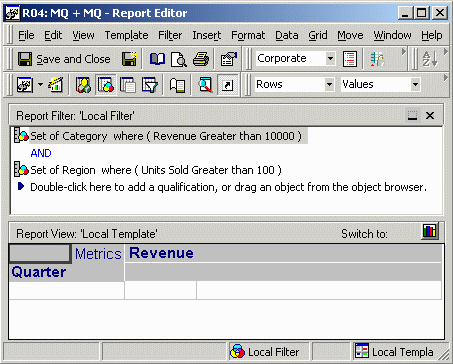
Metric qualifications, when combined with AND, are applied to the final result pass in the form of inner joins in the FROM clause. For example, a report defined as follows produces three passes of SQL. The MQ passes appear in the FROM clause in the final pass.
create table ZZMQ00 nologging as
select a11.CATEGORY_ID CATEGORY_ID
from YR_CATEGORY_SLS a11
group by a11.CATEGORY_ID
having sum(a11.TOT_DOLLAR_SALES) > 10000.0
create table ZZMQ01 nologging as
select a12.REGION_ID REGION_ID
from CITY_CTR_SLS a11
join LU_CALL_CTR a12
on (a11.CALL_CTR_ID = a12.CALL_CTR_ID)
group by a12.REGION_ID
having sum(a11.TOT_UNIT_SALES) > 100.0
select a16.QUARTER_ID QUARTER_ID,
a17.QUARTER_DESC QUARTER_DESC,
sum(a11.TOT_DOLLAR_SALES) WJXBFS1
from SUBCATEG_MNTH_CTR_SLS a11
join LU_SUBCATEG a12
on (a11.SUBCAT_ID = a12.SUBCAT_ID)
join ZZMQ00 pa13
on (a12.CATEGORY_ID = pa13.CATEGORY_ID)
join LU_CALL_CTR a14
on (a11.CALL_CTR_ID = a14.CALL_CTR_ID)
join ZZMQ01 pa15
on (a14.REGION_ID = pa15.REGION_ID)
join LU_MONTH a16
on (a11.MONTH_ID = a16.MONTH_ID)
join LU_QUARTER a17
on (a16.QUARTER_ID = a17.QUARTER_ID and
a16.YEAR_ID = a17.YEAR_ID)
group by a16.QUARTER_ID,
a17.QUARTER_DESC
Observe in this example that the set qualifications have different output levels (Category vs. Region). A separate pass is required for each metric qualification. Set operator optimization cannot be used with this report because set operators may be used only when the output level of each set qualification is the same.
Changing the conjunction between the metric qualifications to AND NOT alters the SQL as follows. It is no longer possible to use inner joins for both qualifications because one of them has to be inverted. Instead, the second qualification appears as a subquery in the WHERE clause of the final result pass. The first qualification remains affirmative, so it again appears in the final result pass as an inner join.
Because the qualifications are at different levels, set operator optimization is not possible.
create table ZZMQ00 nologging as
select a11.CATEGORY_ID CATEGORY_ID
from YR_CATEGORY_SLS a11
group by a11.CATEGORY_ID
having sum(a11.TOT_DOLLAR_SALES) > 10000.0
create table ZZMQ01 nologging as
select a12.REGION_ID REGION_ID
from CITY_CTR_SLS a11
join LU_CALL_CTR a12
on (a11.CALL_CTR_ID = a12.CALL_CTR_ID)
group by a12.REGION_ID
having sum(a11.TOT_UNIT_SALES) > 100.0
select a14.QUARTER_ID QUARTER_ID,
a16.QUARTER_DESC QUARTER_DESC,
sum(a11.TOT_DOLLAR_SALES) WJXBFS1
from SUBCATEG_MNTH_CTR_SLS a11
join LU_SUBCATEG a12
on (a11.SUBCAT_ID = a12.SUBCAT_ID)
join ZZMQ00 pa13
on (a12.CATEGORY_ID = pa13.CATEGORY_ID)
join LU_MONTH a14
on (a11.MONTH_ID = a14.MONTH_ID)
join LU_CALL_CTR a15
on (a11.CALL_CTR_ID = a15.CALL_CTR_ID)
join LU_QUARTER a16
on (a14.QUARTER_ID = a16.QUARTER_ID and
a14.YEAR_ID = a16.YEAR_ID)
where (not ((a15.REGION_ID)
in (select ps21.REGION_ID
from ZZMQ01 ps21)))
group by a14.QUARTER_ID,
a16.QUARTER_DESC
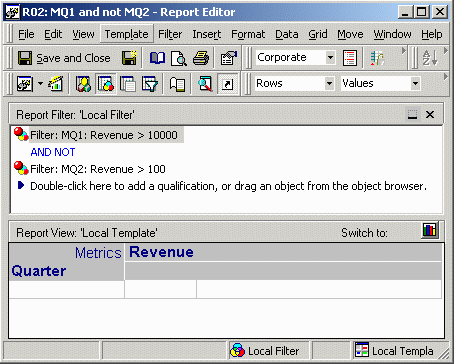
If the metric qualifications are at the same level, as in this report, it would be possible to use set operators. However, the SQL Generation Engine employs a more sophisticated optimization.
create table ZZMQ00 nologging as
select a11.QUARTER_ID QUARTER_ID
from QTR_CATEGORY_SLS a11
group by a11.QUARTER_ID
having (sum(a11.TOT_DOLLAR_SALES) > 10000.0
and (not sum(a11.TOT_DOLLAR_SALES) > 100.0))
select a11.QUARTER_ID QUARTER_ID,
a13.QUARTER_DESC QUARTER_DESC,
sum(a11.TOT_DOLLAR_SALES) WJXBFS1
from QTR_CATEGORY_SLS a11
join ZZMQ00 pa12
on (a11.QUARTER_ID = pa12.QUARTER_ID)
join LU_QUARTER a13
on (a11.QUARTER_ID = a13.QUARTER_ID)
group by a11.QUARTER_ID,
a13.QUARTER_DESC
One pass is generated, producing one set representing both metric qualifications. This is more efficient than generating a separate pass for each metric qualification and merging both sets in subsequent passes.
Even if the Set Operator Optimization VLDB property is enabled, the SQL Generation Engine will prefer this optimization over set operators.
The set operator optimization will apply to metric qualifications if all of the following conditions are met:
For instance, a report defined as follows will use set operator optimization if enabled:
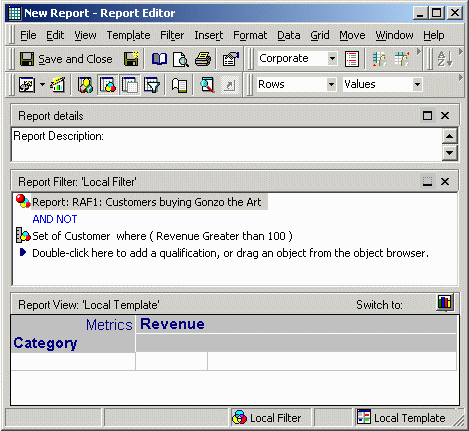
With set operator optimization enabled, the SQL is as follows:
create table ZZMQ00 nologging as
select a11.CUSTOMER_ID CUSTOMER_ID,
sum((a11.QTY_SOLD * (a11.UNIT_PRICE - a11.DISCOUNT))) WJXBFS1
from ORDER_DETAIL a11
where a11.ITEM_ID in (11)
group by a11.CUSTOMER_ID
create table ZZMQ01 nologging as
select a11.CUSTOMER_ID CUSTOMER_ID
from CUSTOMER_SLS a11
join ZZMQ00 pa12
on (a11.CUSTOMER_ID = pa12.CUSTOMER_ID)
where (a11.TOT_DOLLAR_SALES > 100.0)
select a13.CATEGORY_ID CATEGORY_ID,
a14.CATEGORY_DESC CATEGORY_DESC,
sum((a11.QTY_SOLD * (a11.UNIT_PRICE - a11.DISCOUNT))) WJXBFS1
from ORDER_DETAIL a11
join LU_ITEM a12
on (a11.ITEM_ID = a12.ITEM_ID)
join LU_SUBCATEG a13
on (a12.SUBCAT_ID = a13.SUBCAT_ID)
join LU_CATEGORY a14
on (a13.CATEGORY_ID = a14.CATEGORY_ID)
where (a11.CUSTOMER_ID)
in (((select ps21.CUSTOMER_ID
from ZZMQ00 ps21)
minus (select ps21.CUSTOMER_ID))
from ZZMQ01 ps21)
group by a13.CATEGORY_ID,
a14.CATEGORY_DESC
