EducationSoftwareStrategy.com
StrategyCommunity

Knowledge Base

Product

Community

Knowledge Base

TopicsBrowse ArticlesDeveloper Zone

Product

Download SoftwareProduct DocumentationSecurity Hub

Education

Tutorial VideosSolution GalleryEducation courses

Community

GuidelinesGrandmastersEvents
x_social-icon_white.svglinkedin_social-icon_white.svg
Strategy logoCommunity

© Strategy Inc. All Rights Reserved.

LegalTerms of UsePrivacy Policy
  1. Home
  2. Topics

KB13577: Where are MicroStrategy Developer 9.4.x-10.x preferences stored?


Stefan Zepeda

Salesforce Solutions Architect • Strategy


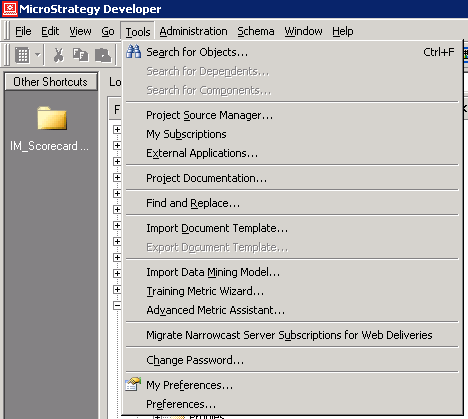
MicroStrategy Developer 9.4.x-10.x preferences can be found by opening the Tools menu in the MicroStrategy Developer console

Strategy Developer 9.4.x-10.x preferences can be found by opening the Tools menu in the Strategy Developer console, as shown below:
ka02R000000kX5HQAU_0EM440000002Ixg.png

My Preferences
Tools -> My Preferences are stored in the metadata. Changes in these preferences are user specific. Changes in My Preferences will be applied once a user opens a project. My Preferences are shown in the image below:

ka02R000000kX5HQAU_0EM440000002Ixq.png

 
Preferences
Tools -> Preferences are stored on the machine's registry. Changes in these preferences are machine specific. Changes in Preferences are applied in real time. These Preferences are shown in the image below:

ka02R000000kX5HQAU_0EM440000002Ixv.png

Comment

0 comments

Details

Knowledge Article

Published:

April 10, 2017

Last Updated:

April 10, 2017