Strategy Web preferences, both user and project default level preferences, are stored in the Strategy metadata.
USER LEVEL PREFERENCES
The user preferences are stored at the session level. The user must log out and log back in to see the changes applied.
For example, a user logs in and changes preferences. When the user opens a new session, he does not see the changes applied. The user logs out and logs back in. The user now sees changes applied.
PROJECT DEFAULT LEVEL PREFERENCES
Project default level preferences are set at the Strategy Intelligence Server 8.x level and not on the cluster level. The project default level preferences are accessed by the Web server at connection time. The preferences are stored in memory.
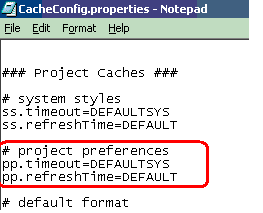
The cache.config.properties file stores the values of how often caches are loaded into memory. The default refresh time for project preferences is 24 hours.
CLUSTERED Strategy INTELLIGENCE SERVERS
After changing project default level preferences on one cluster, users will need to wait until the second server in the cluster has loaded these preferences into memory to see the preferences take effect across all servers.
To change the default refresh time, follow the steps below:
NOTE: Strategy designed this system of changing preferences after reading from the metadata to optimize performance. Note that decreasing the refreshTime will increase queries to the metadata, which may impact performance.
