Prompting should be handled with care in Freeform SQL reports because the Strategy SQL Generation Engine does not have complete control over the SQL syntax.
Prompting mechanism in Freeform SQL reports
At run time, prompts in Freeform SQL reports are rendered with simple string substitution into the SQL statement entered into the Freeform SQL definition dialog. The Freeform SQL report definition pictured below includes report limit on the revenue metric where the value for comparison comes from a value prompt:
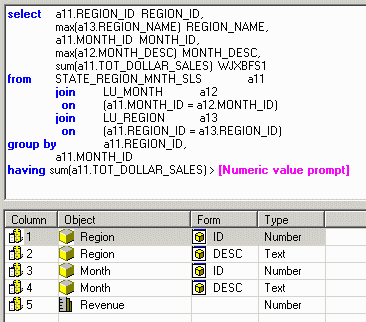
When a user executes the report and enters, for instance, 10000 in response to the prompt, the following SQL is submitted against the warehouse. The prompt identifier [Numeric value prompt] is replaced by the prompt answer.
select   a11.REGION_ID REGION_ID,

   max(a13.REGION_NAME) REGION_NAME,

   a11.MONTH_ID MONTH_ID,

   max(a12.MONTH_DESC) MONTH_DESC,

   sum(a11.TOT_DOLLAR_SALES) WJXBFS1

from   STATE_REGION_MNTH_SLS   a11

   join   LU_MONTH   a12

    on    (a11.MONTH_ID = a12.MONTH_ID)

   join   LU_REGION   a13

    on    (a11.REGION_ID = a13.REGION_ID)

group by   a11.REGION_ID,

   a11.MONTH_ID

having sum(a11.TOT_DOLLAR_SALES) > 10000
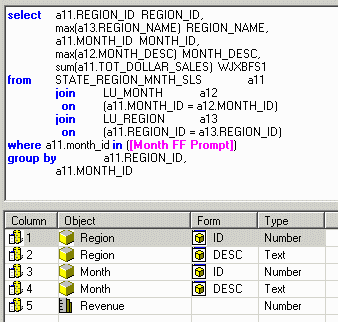
select   a11.REGION_ID REGION_ID,

   max(a13.REGION_NAME) REGION_NAME,

   a11.MONTH_ID MONTH_ID,

   max(a12.MONTH_DESC) MONTH_DESC,

   sum(a11.TOT_DOLLAR_SALES) WJXBFS1

from   STATE_REGION_MNTH_SLS   a11

   join   LU_MONTH   a12

    on    (a11.MONTH_ID = a12.MONTH_ID)

   join   LU_REGION   a13

    on    (a11.REGION_ID = a13.REGION_ID)

where a11.month_id in (200404, 200405, 200406)

group by   a11.REGION_ID,

   a11.MONTH_ID
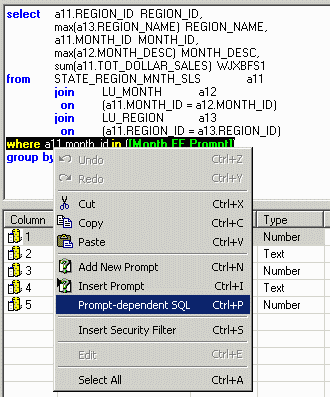
When the report is executed with no prompt answer, the entire where clause no longer appears in the SQL, as shown below:
select   a11.REGION_ID REGION_ID,

   max(a13.REGION_NAME) REGION_NAME,

   a11.MONTH_ID MONTH_ID,

   max(a12.MONTH_DESC) MONTH_DESC,

   sum(a11.TOT_DOLLAR_SALES) WJXBFS1

from   STATE_REGION_MNTH_SLS   a11

   join   LU_MONTH   a12

    on    (a11.MONTH_ID = a12.MONTH_ID)

   join   LU_REGION   a13

    on    (a11.REGION_ID = a13.REGION_ID)
This poses the following two challenges to the report designer:
Report designers may overcome this problem by including a dummy condition in the where clause, as illustrated below:
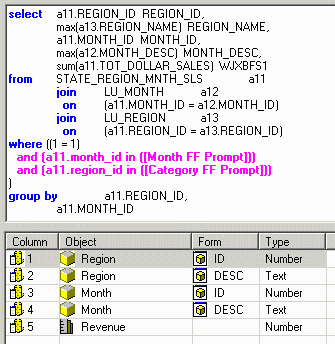
(1 = 1) at the beginning of the where clause always evaluates to true; thus, when combined with other qualifications using "and," it will not change the outcome. The four scenarios render correct SQL as follows, and each will produce the expected results:
Users may observe that this is roughly the same mechanism employed for optional prompts in Query Builder reports. For instance, consider a Query Builder report defined with the following filter qualifications:
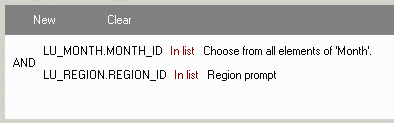
Both prompts are optional. If the user runs the report and does not answer the Month prompt, the SQL Generation Engine substitutes a qualification that will always evaluate to true. The effect is that the qualification has no effect on the results generated.
select   pa2.REGION_ID WJXBFS0,

   pa2.REGION_NAME WJXBFS1,

   pa1.MONTH_ID WJXBFS2,

   pa1.MONTH_DESC WJXBFS3,

   sum(pa0.TOT_DOLLAR_SALES) Column1

from   STATE_REGION_MNTH_SLS   pa0

   join   LU_MONTH   pa1

    on    (pa0.MONTH_ID = pa1.MONTH_ID)

   join   LU_REGION   pa2

    on    (pa0.REGION_ID = pa2.REGION_ID)

where   (pa1.MONTH_ID in (pa1.MONTH_ID)

    and pa2.REGION_ID in (1, 2, 3))

group by   pa2.REGION_ID,

   pa2.REGION_NAME,

   pa1.MONTH_ID,

   pa1.MONTH_DESC
