SYMPTOM:
Strategy ODBC Driver for Oracle Wire Protocol returns results with trailing spaces when using CHAR semantics and UTF8 encoding.
There are two ways to specify usage of CHAR semantics on the Oracle database:
In this technical note, method (a) will be used.
STEPS TO REPRODUCE:
Follow the steps below to reproduce the issue:

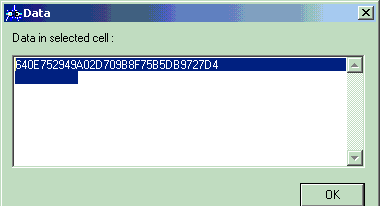
This is not expected behavior because there should no trailing spaces beyond 32 characters (size of the Char datatype column). The user can export the result to Microsoft Excel and determine that the number of trailing spaces extends up to 96 characters. That is, upon highlighting the individual cell in the MS Excel file, the user will be able to move the cursor along up to triple the number of characters (96 characters). The number of trailing spaces is always twice the length defined. That is, if the column is defined as CHAR(32 CHAR) then the cursor can be moved up to 96 spaces (32 + 32*2).
This issue does not occur with a native oracle driver such as the Oracle 10g driver. Perform the above steps using the native oracle driver and it is found that the cursor cannot be moved beyond 32 characters.
The issue does not happen with BYTE semantics on the Oracle database.
CAUSE:
This is a known issue in the Strategy ODBC Driver for Oracle Wire Protocol. This driver is manufactured by DataDirect Technologies. The following document from the DataDirect Knowledge Base describes this issue:
http://knowledgebase.datadirect.com/kbase.nsf/ce24d9443437511f85256e57006bfe2a/a1d7f5b079ca490485256f6b006874ef?OpenDocument
ACTION:
As described in the above-mentioned DataDirect document, the workaround would be to add the connection option ColumnSizeAsCharacter=1. For adding this option to the Strategy ODBC Driver for Oracle Wire Protocol on Windows, follow the steps below:
For the Strategy ODBC Driver for Oracle Wire Protocol on UNIX, add the connection option ColumnSizeAsCharacter=1 into the specific DSN section in the odbc.ini file.
NOTES:
Registry Modification:
WARNING:
Modifying registry values incorrectly may cause serious, system-wide problems that may require the re-installation of Microsoft Windows NT. Any edit of the registry is done at the user's own risk. Since these are user-initiated changes, they are not covered by any Strategy warranty. If using Microsoft Windows NT, the user should backup the registry and/or update an Emergency Repair Disk (ERD) prior to alterations.
