EducationSoftwareStrategy.com
StrategyCommunity

Knowledge Base

Product

Community

Knowledge Base

TopicsBrowse ArticlesDeveloper Zone

Product

Download SoftwareProduct DocumentationSecurity Hub

Education

Tutorial VideosSolution GalleryEducation courses

Community

GuidelinesGrandmastersEvents
x_social-icon_white.svglinkedin_social-icon_white.svg
Strategy logoCommunity

© Strategy Inc. All Rights Reserved.

LegalTerms of UsePrivacy Policy
  1. Home
  2. Topics

KB13627: How to specify which servers can reform a cluster at startup in MicroStrategy Intelligence Server 9.x and newer


Community Admin

• Strategy


SYMPTOM:
In Strategy Intelligence Server 9.x and newer, users have the ability to specify which servers can reform a cluster at startup. This can be done by following the steps listed below:
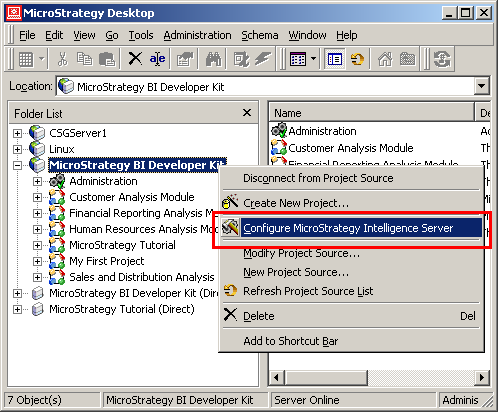
 

  • In Strategy Developer 9.x and newer, right-click on a project source and selecting 'Configure Strategy Intelligence Server,' as shown below:
ka04W000000OfgcQAC_0EM440000002ZHX.jpeg
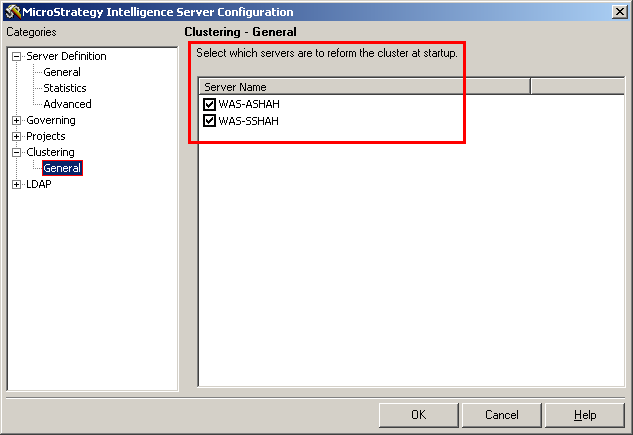
  • In the Strategy Intelligence Server Configuration Editor, select Clustering -> General, as shown below:
ka04W000000OfgcQAC_0EM440000002ZHW.jpeg

The "General" subcategory page in the Intelligence Server Configuration dialog box displays the names of all the servers that are available in a clustered environment. This option enables users to select the servers to form a cluster when manually restarting Strategy Intelligence Server 9.x and newer. Also, if the Intelligence Server shuts down due to any reason, it will automatically be rejoined to the cluster on startup.


Comment

0 comments

Details

Knowledge Article

Published:

November 9, 2017

Last Updated:

November 9, 2017