SYMPTOM:
A user attempts to execute a report in Strategy Developer 10.x against a DB2 UDB database and the following error occurs:
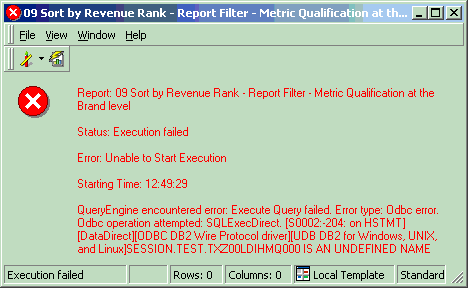
Execute Query failed. Error type: Odbc error. Odbc operation attempted: SQLExecDirect. SESSION.TEST.TXZ00LDIHMQ000 IS AN UNDEFINED NAME
The error occurs on the following SQL statement:
declare global temporary table session.TEST.TXZ00LDIHMQ000(
BRAND_ID SMALLINT)
partitioning key (BRAND_ID) on commit preserve rows not logged.
The following VLDB properties apply to this report:
The above error message implies that the location that is defined by the combination of Data Source Name (used in the Database Connection) and the prefix 'TEST' does not exist, and hence the object (in this case, the intermediate table TXZ00LDIHMQ000) cannot be created there. In this example, a prefix has not been set for intermediate tables in either of the following ways:
The prefix 'TEST' appears in the report SQL only after this pass of SQL has been submitted to the warehouse. It does not appear when just viewing the report SQL (using 'SQL view' in the report editor) as shown below:
declare global temporary table session.ZZMQ00(
BRAND_ID SMALLINT)
partitioning key (BRAND_ID) on commit preserve rows not logged
CAUSE:
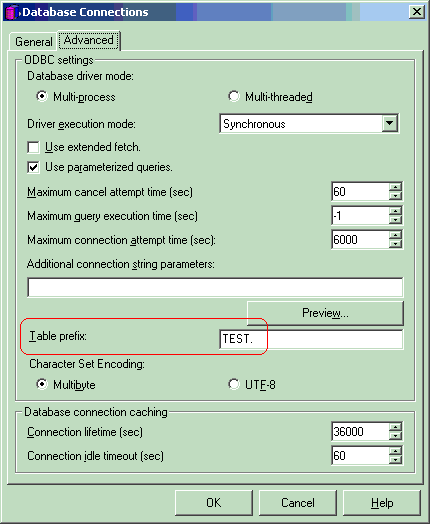
The prefix 'TEST' is being generated from the 'Table prefix' setting at the Database Connection level (located at Database Instance -> Database Connection -> Advanced) as shown in the following image:
ACTION:
Remove prefix 'TEST' from the 'Table prefix' setting at the Database Connection level. Replace it by the default value, which is 'zz,' or whatever value as appropriate.
The purpose of this prefix at the Database Connection level is to help differentiate between the intermediate table name from the table names in the warehouse. By default, this prefix is 'zz' and that is why intermediate table names start with ZZ. Refer to the following Strategy Knowledge Base Article for details on this:
KB4295: What is the Intermediate Table Naming Convention for MicroStrategy SQL Generation Engine?
Third Party Software Installation:
WARNING:
The third-party product(s) discussed in this technical note is manufactured by vendors independent of Strategy. Strategy makes no warranty, express, implied or otherwise, regarding this product, including its performance or reliability.
