EducationSoftwareStrategy.com
StrategyCommunity

Knowledge Base

Product

Community

Knowledge Base

TopicsBrowse ArticlesDeveloper Zone

Product

Download SoftwareProduct DocumentationSecurity Hub

Education

Tutorial VideosSolution GalleryEducation courses

Community

GuidelinesGrandmastersEvents
x_social-icon_white.svglinkedin_social-icon_white.svg
Strategy logoCommunity

© Strategy Inc. All Rights Reserved.

LegalTerms of UsePrivacy Policy
  1. Home
  2. Topics

KB13674: ‘The generated SQL/MDX string (xxxxx bytes) is longer than the limitation of the corresponding connector (yyyyy bytes)’ error occurs when executing a report in MicroStrategy Developer 9.4.x-10.x


Stefan Zepeda

Salesforce Solutions Architect • Strategy


This technical note documents why ‘The generated SQL/MDX string (xxxxx bytes) is longer than the limitation of the corresponding connector (yyyyy bytes)’ error occurs when executing a report in MicroStrategy Developer 9.4.x-10.x. A resolution has been provided.

SUMMARY:
This technical note documents why ‘The generated SQL/MDX string (xxxxx bytes) is longer than the limitation of the corresponding connector (yyyyy bytes)’ error occurs when executing a report in Strategy Developer 9.4.x-10.10. A resolution has been provided.
SYMPTOM:
On executing a report in Strategy Developer 9.4.x-10.10, users encounter the following error:

ka02R000000kUsqQAE_0EM440000002FWS.jpeg


Error: SQL Generation Complete[]QueryEngine encountered error: The generated SQL/MDX string (xxxxx bytes) is longer than the limitation of the corresponding connector (yyyyy bytes).[]Error in Process method of Component: QueryEngineServer, Project ###, Job ###, Error Code=-2147212544

CAUSE:
This issue occurs because the governing limit of the 'Maximum SQL/MDX Size' VLDB property (which specifies the SQL size on a pass-by-pass basis) is exceeded. The Maximum SQL/MDX Size is the Maximum size of SQL string accepted by a certified ODBC driver (bytes).
Starting from Strategy 10.11, the default value for “Maximum SQL/MDX Size” has been increased.
The modified default value varies depending on database type.
For example,
For Oracle, it is 2147483647
For Teradata, it is 1048576
For IBM DB2 and Microsoft SQL server, it is 524288
 
ACTION:
To resolve this issue, increase the 'Maximum SQL/MDX Size' governing VLDB property. This VLDB property can be modified at the Project Level by following the steps listed below:

  • Using Strategy Developer 9.4.x-10.10, right-click on a project and select Project Configuration, as shown below:
ka02R000000kUsqQAE_0EM440000002FWK.jpeg
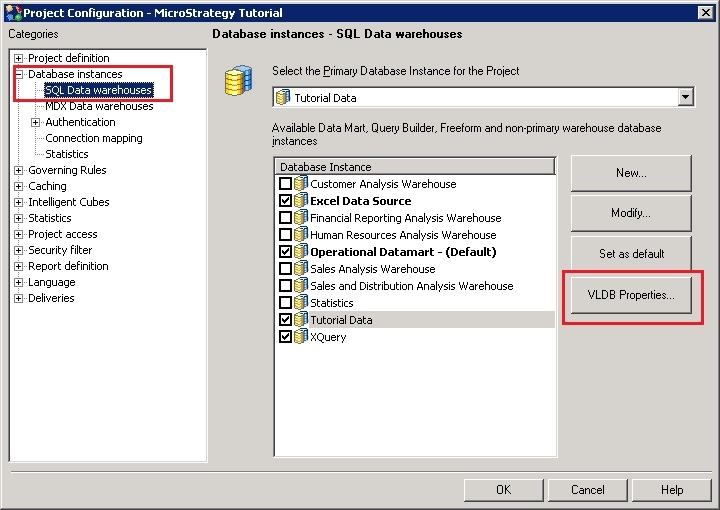
  • In the Project Configuration Editor, select 'VLDB Properties…' under Database instances -> SQL Data warehouses or Database instances -> MDX Data warehouses, depending on whether the error came up for a regular report or MDX report, as shown below:
ka02R000000kUsqQAE_0EM440000002Hul.jpeg
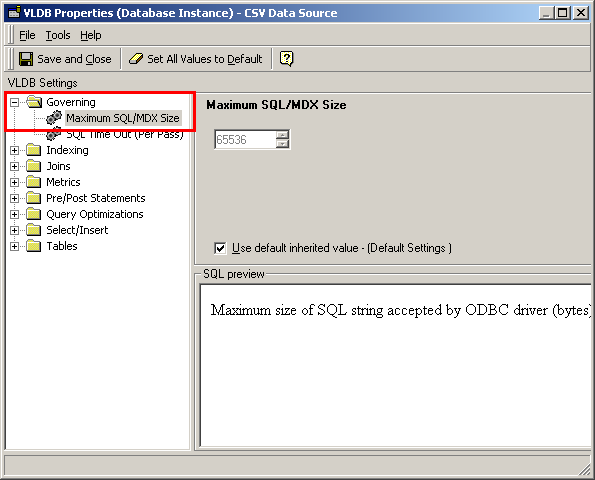
  • In the VLDB Properties Editor, expand Governing and select 'Maximum SQL/MDX Size,' as shown below:
ka02R000000kUsqQAE_0EM440000002FWQ.jpeg
  • Uncheck the 'Use default inherited value - (Default Settings)' and increase the Maximum SQL/MDX Size as applicable, as shown below:
ka02R000000kUsqQAE_0EM440000002FWR.jpeg

The options for the VLDB property are:

  • 0 or -1, both default to 64000 bytes
  • Any number between 1 and 999999999, this is the maximum SQL pass size in bytes
  • Use default inherited value (depends on data-base)

NOTES:

  • The default size may be different for different databases. It changes depending on the database instance, which is selected by the user.
  • This size should be set to a value that a certified ODBC driver can handle.
  • Increasing this size to a large value may risk the report failing in the ODBC driver.
  • If increasing this value does not resolve the issue, then reduce the size of the SQL being generated by simplifying the report through removing attributes, metrics, and/or filters. An area to be especially aware of is importing large sets of elements for filters.

KB13674


Comment

0 comments

Details

Knowledge Article

Published:

April 4, 2017

Last Updated:

February 26, 2019