SYMPTOM:
When a user tries to subscribe to a report in Strategy Web 9.4.x, the following error occurs:

Error in My Subscriptions User request is completed. The Maximum RAM for Working Set cache limit has been exceeded with this request. Please try again later or contact your Administrator.
CAUSE:
The working set result pool is a collection of in-memory reports over all user sessions. When a report execution or manipulation has completed in Web, the results of that report are added to a user's working set. In this instance, the user's request to add a report caused the maximum memory that can be allocated for the working set pool to be exceeded resulting in the error.
For more detailed information about the operation of the Working Set, please see the Technical Note:
ACTION:
Access the Strategy Intelligence Server Configuration and go to Governing Rules-> Memory Settings and increase the setting 'Maximum RAM for Working Set cache (Kbytes)' to a value that is reasonable for the user's environment based on user activity, as shown below:
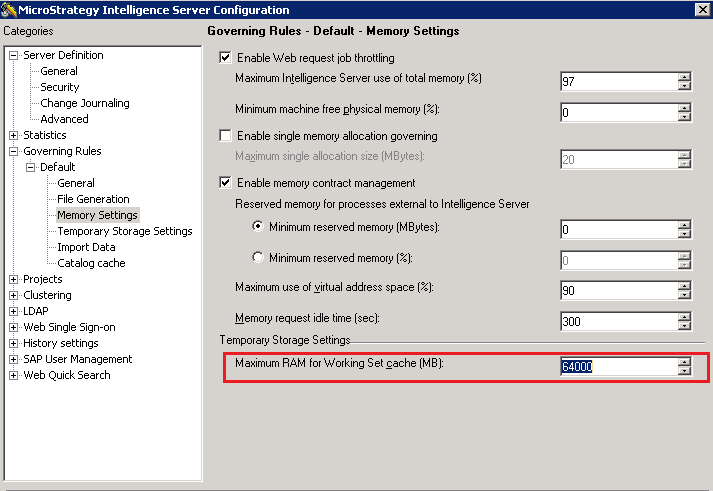
Depending on the resources available and the version installed, please set the Maximum working set RAM to a number between the following list:
-Before Strategy 9.5, the maximum limit is 64GB (65536 MB) for both Windows 32 bit and 64 bit.
-On Strategy 10.x the limit is 2 TB (2097152 MB).
WARNING:
Increasing the 'Maximum RAM for Working Set cache' setting will increase the possible limit amount of RAM that can be used by the Strategy Intelligence Server. Setting this to a higher limit does not mean the memory will be set aside for immediate use by the Strategy Intelligence Server. However, if needed, that limit is available, in the same way, the Maximum RAM for cache settings behave.
13699
