EducationSoftwareStrategy.com
StrategyCommunity

Knowledge Base

Product

Community

Knowledge Base

TopicsBrowse ArticlesDeveloper Zone

Product

Download SoftwareProduct DocumentationSecurity Hub

Education

Tutorial VideosSolution GalleryEducation courses

Community

GuidelinesGrandmastersEvents
x_social-icon_white.svglinkedin_social-icon_white.svg
Strategy logoCommunity

© Strategy Inc. All Rights Reserved.

LegalTerms of UsePrivacy Policy
  1. Home
  2. Topics

KB13700: How to capture SQL exclusively submitted by the Metadata Server in MicroStrategy Intelligence Server


Community Admin

• Strategy


Article outlines how to capture SQL exclusively submitted by the Metadata Server in MicroStrategy Intelligence Server.

The Metadata Server diagnostic is used to capture the SQL submitted exclusively by the Metadata Server. This is a subset of the Database Classes diagnostic that captures all SQL that is submitted to the metadata to be executed against the warehouse. In order to capture the SQL submitted exclusively by the Metadata Server, follow the steps below:
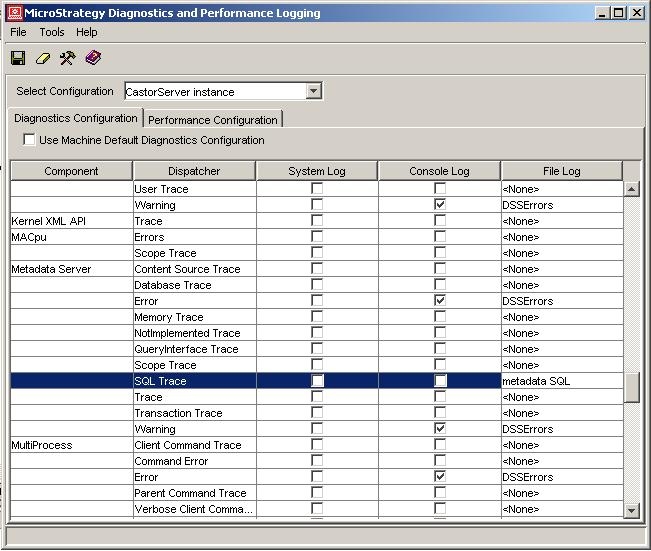
 

  • Go to Programs -> Strategy -> Tools -> Diagnostics Configuration, as shown below:
ka04W000000uG8gQAE_0EM440000002BdA.jpeg
  • Ensure that the Select Configuration shows 'CastorServer instance.'
  • Go to the component 'Metadata Server' and dispatcher 'SQL Trace.'
    In Strategy 2020, the 'SQL Trace' dispatcher is under the 'MSql' component.
  • Click on the drop down for the corresponding 'File Log' and choose the log file to which the SQL Trace needs to be written into. The user can also write the SQL Trace to a new log file by selecting the option from the drop down. In the screenshot above, the SQL is being logged to the metadata SQL.log file. This file can be found under the Program Files -> Common Files -> Strategy ->Log folder in a Windows Machine.

NOTE: Enabling the SQL tracing is used for troubleshooting purposes since performance can be greatly reduced due to intensive hard-disk access.


Comment

0 comments

Details

Knowledge Article

Published:

June 12, 2017

Last Updated:

June 12, 2017