SYMPTOM:
A user executes a Query Builder report, answering prompts contained in the filter, and receives an error like the following in Strategy Developer 9.x upon submitting the job to the database:
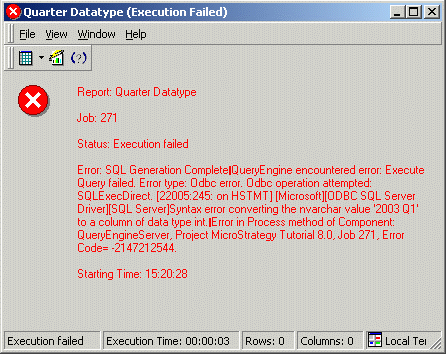
Report: Quarter Datatype
Job: 271
Status: Execution failed
Error: SQL Generation Complete
QueryEngine encountered error: Execute Query failed. Error type: Odbc error. Odbc operation attempted: SQLExecDirect. Syntax error converting the nvarchar value '2003 Q1' to a column of data type int. Error in Process method of Component: QueryEngineServer, Project Strategy Tutorial 8.0, Job 271, Error Code= -2147212544.
NOTE: This error was produced when executing a report against Microsoft SQL Server. The message text will vary depending on the database platform.
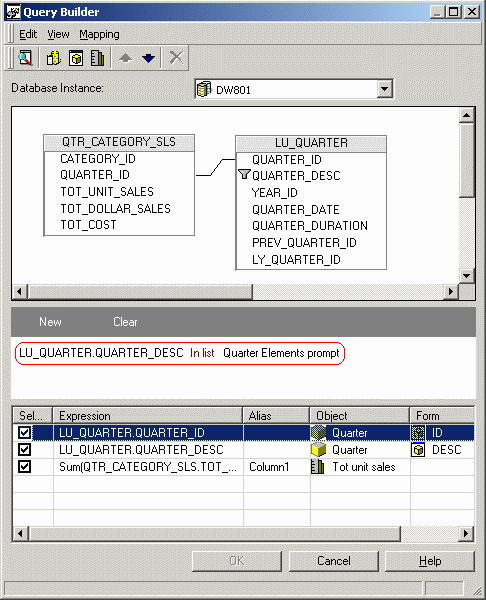
The report is constructed with an element prompt, as shown below:
CAUSE:
In the report SQL, the Quarter attribute's description column is being compared to numeric Quarter Ids, as shown below:.
select pa1.QUARTER_ID WJXBFS0,
pa1.QUARTER_DESC WJXBFS1,
sum(pa0.TOT_UNIT_SALES) Column1
from QTR_CATEGORY_SLS pa0
join LU_QUARTER pa1
on (pa0.QUARTER_ID = pa1.QUARTER_ID)
where pa1.QUARTER_DESC in (20041, 20042, 20043, 20044)
group by pa1.QUARTER_ID,
pa1.QUARTER_DESC
By design, attribute element prompts insert element IDs into the SQL statement. For the query to execute correctly, the quarter element prompt in this report must be applied to the QUARTER_ID column.
While attribute element prompts are likely the most common scenario for this kind of data type mismatch, the same error may occur whenever mixing data types in a Query Builder filter. For this reason, Strategy Developer presents the following warning to the user if the type of the column in a qualification does not match the type of the comparison expression:
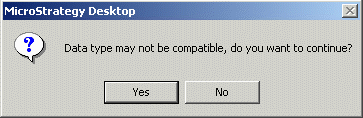
Data type may not be compatible, do you wish to continue?
This is left as an option to the user because the warehouse data may support implicit type conversion within the database, in which case the query may be successful even though the data types do not match exactly.
ACTION:
Ensure that the data types are compatible throughout the filter qualification expression. In this case, changing the column from QUARTER_DESC to QUARTER_ID produces a successful query.
