EducationSoftwareStrategy.com
StrategyCommunity

Knowledge Base

Product

Community

Knowledge Base

TopicsBrowse ArticlesDeveloper Zone

Product

Download SoftwareProduct DocumentationSecurity Hub

Education

Tutorial VideosSolution GalleryEducation courses

Community

GuidelinesGrandmastersEvents
x_social-icon_white.svglinkedin_social-icon_white.svg
Strategy logoCommunity

© Strategy Inc. All Rights Reserved.

LegalTerms of UsePrivacy Policy
  1. Home
  2. Topics

KB13735: A MicroStrategy Narrowcast Server email service generates the output email file but is unable to deliver the email to the end user


Community Admin

• Strategy


This article explains why a MicroStrategy Narrowcast Server email service generates the output email file but is unable to deliver the email to the end user

SYMPTOM:
A Strategy Narrowcast Server email service generates the resulting email file to the folder specified inside the Information Transmitter. However, the email does not reach the end user. With Strategy SMTP tracing on, the following error appears inside the SMTP log:
??250-TURN??250-SIZE??250-ETRN??250-PIPELINING??250-DSN??250-ENHANCEDSTATUSCODES??250-8bitmime??250-BINARYMIME??250-CHUNKING??250-VRFY??250-X-EXPS GSSAPI NTLM LOGIN??250-X-EXPS=LOGIN??250-AUTH GSSAPI NTLM LOGIN??250-AUTH=LOGIN??250-X-LINK2STATE??250-XEXCH50??250 OK??>>
Action:SEND Data (hex) << 4d 41 49 4c 20 46 52 4f 4d 3a 3c 40 6d 69 63 72 6f 73 74 72 61 74 65 67 79 2e 63 6f 6d 3e 0d 0a >> (str) <<MAIL FROM:<@Strategy.com>??>>
Action:RECV Data (hex) << 35 30 31 20 35 2e 35 2e 34 20 49 6e 76 61 6c 69 64 20 41 64 64 72 65 73 73 0d 0a >> (str) <<501 5.5.4 Invalid Address??>>
For more information on how to turn on Strategy SMTP log, refer to the following Strategy Knowledge Base article:
KB9762: How to generate the Strategy SMTP Protocol log file for Strategy Narrowcast Server
CAUSE:
The email address used by the email Information Transmitter's Delivery Status Notification is invalid, even when Delivery Status Notification is not enabled, as shown below:
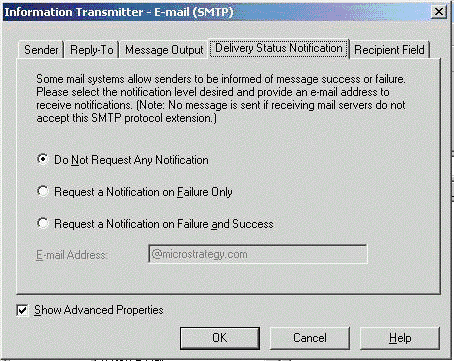
ka04W000000Odq8QAC_0EM440000002Bcr.gif

 
ACTION:
Modify the Information Transmitter used by the Strategy Narrowcast Server service by following the steps below:
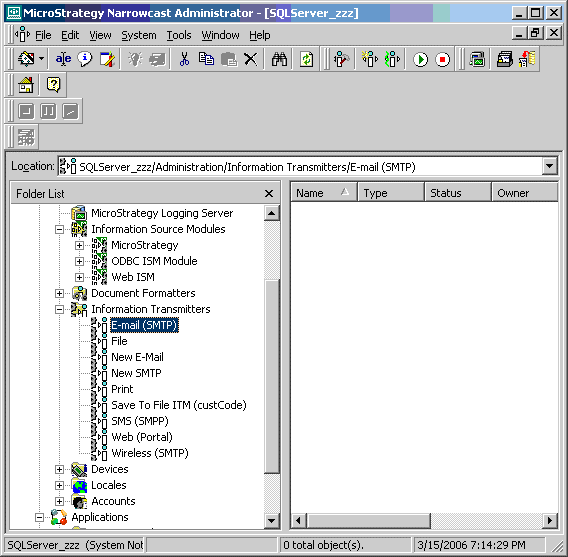
 

  • Locate the Information Transmitter used by the Strategy Narrowcast Server service, as shown below:
ka04W000000Odq8QAC_0EM440000002Bco.gif
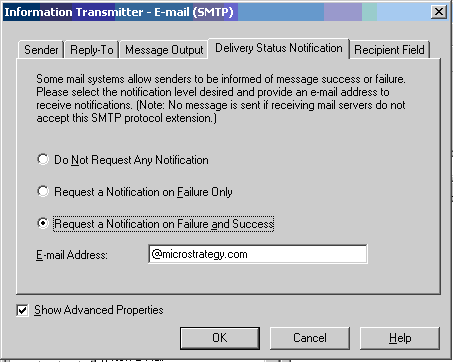
  • Edit the Information Transmitter and navigate to the 'Delivery Status Notification' tab, as shown below:
ka04W000000Odq8QAC_0EM440000002Bcq.gif
  • For the E-mail Address field, provide a valid email address.
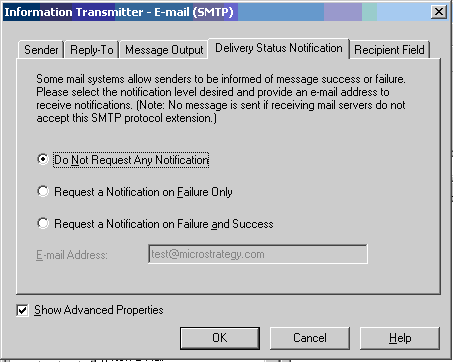
  • If Delivery Notification is not used, the user can select 'Do Not Request Any Notification' after providing a valid email address, as shown below:
ka04W000000Odq8QAC_0EM440000002Bcp.gif
  • Re-execute the service and the user will now receive the email.

Comment

0 comments

Details

Knowledge Article

Published:

June 15, 2017

Last Updated:

June 15, 2017