EducationSoftwareStrategy.com
StrategyCommunity

Knowledge Base

Product

Community

Knowledge Base

TopicsBrowse ArticlesDeveloper Zone

Product

Download SoftwareProduct DocumentationSecurity Hub

Education

Tutorial VideosSolution GalleryEducation courses

Community

GuidelinesGrandmastersEvents
x_social-icon_white.svglinkedin_social-icon_white.svg
Strategy logoCommunity

© Strategy Inc. All Rights Reserved.

LegalTerms of UsePrivacy Policy
  1. Home
  2. Topics

KB13825: How to enable the Kernel XML API trace in MicroStrategy Intelligence Server


Community Admin

• Strategy


The Kernel XML API Trace is used in conjunction with the Web XML trace in order to understand the communications between the Intelligence Server and the Web Server. These are collected in matching sets for the diagnosis and investigation conducted by MicroStrategy.

The Kernel XML API Trace is used in conjunction with the Web XML trace in order to understand the communications between the Intelligence Server and the Web Server. These are collected in matching sets for the diagnosis and investigation conducted by Strategy.
 

  • Open the Strategy Diagnostics and Performance Logging application:
    • In Windows: Select Start -> Programs -> Strategy -> Tools -> Diagnostics Configuration
    • In Unix: Execute the application mstrdiag (e.g. /…./install/bin/mstrdiag)
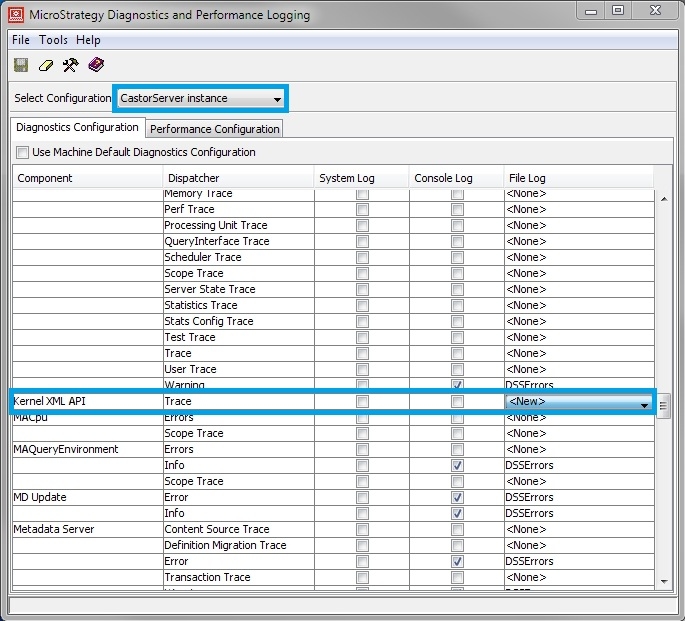
  • Select "CastorServer instance" for configuration type on the top.
  • Browse to the 'Kernel XML API' component, as shown below:
     
ka04W00000148hjQAA_0EM440000002Bd1.jpeg
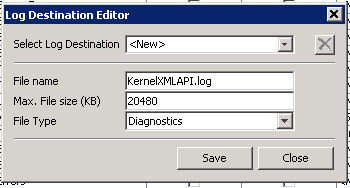
  • Choose the log file destination and either log the information into an existing log file or a new one (as shown in the figure below). The maximum file size must also be set here. 
     
    NOTE: Default Max. File size is 2048KB, usually not enough for troubleshoot. File size need manually increased.
     
ka04W00000148hjQAA_0EM440000002BdD.jpeg
  • Save the configuration and exit.
  • Restart the Intelligence Server.


For additional information, refer to the Strategy Help file or contact Strategy Technical Support.


Comment

0 comments

Details

Knowledge Article

Published:

May 22, 2017

Last Updated:

June 29, 2017