SYMPTOM:
Consider a scenario where in a development environment in Strategy Developer 10.x, a user creates a report with a report filter as follows:

Region In list (France, Germany, Canada)
The lookup table for the Region attribute contains the following entries:
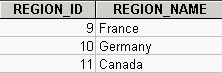
The following WHERE clause is generated for the report filter:
where a11.[REGION_ID] in (9, 10, 11)
The project is now migrated to the production environment. The lookup table for the Region attribute in the production environment contains the following entries:
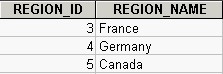
However, when executing the report in the production environment, the WHERE clause is still is generated as it was in the development environment:
where a11.[REGION_ID] in (9, 10, 11)
This will result in incorrect data for this report in the production environment.
CAUSE:
When the report was created with that report filter in the development environment, it is not only the attribute element descriptions (France, Germany, Canada) that are stored as part of the filter definition but also the values of the attribute ID form(s). This means, in the metadata, the report filter definition is stored as:
Region In (France - 9, Germany - 10, Canada - 11)
When generating the SQL, the attribute ID form is used so that the SQL Engine always generates the WHERE clause as:
where a11.[REGION_ID] in (9, 10, 11)
ACTION:
This is working as intended. Strategy does not support elements with changing IDs in an automatic fashion.
WORKAROUND:
Consider the following options to work around this issue:
