USAGE SCENARIO:
Project designers may need to restrict access to certain hierarchies using ACLs (access control lists) in Strategy Developer. For example, users in one department may need to see report results in terms of products, but that information may be irrelevant to a different department. Further, the other department should not even have the option of creating reports at product level.
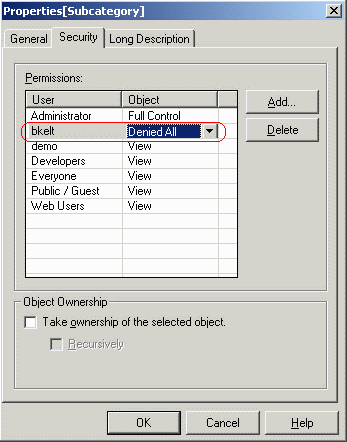
Developers can implement part of this requirement by denying access to certain users or groups at the attribute level. When a user is configured with 'Denied All' permissions on an attribute, that user will not be able to select that attribute in an object prompt to add to the template, as shown below:
For prompted reports, there may be cases in which these user group(s) with access to the attributes should be required to filter on the hierarchy, while users without access to the attributes should be able to run the report as if the prompt did not exist. The application requirements would be:
IMPLEMENTATION:
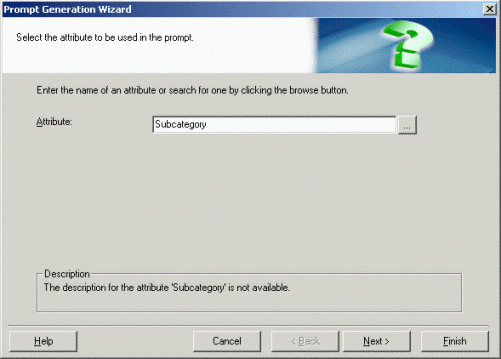
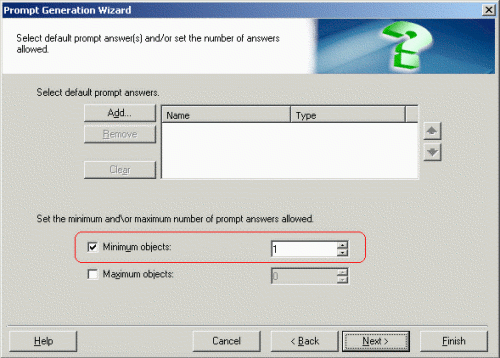
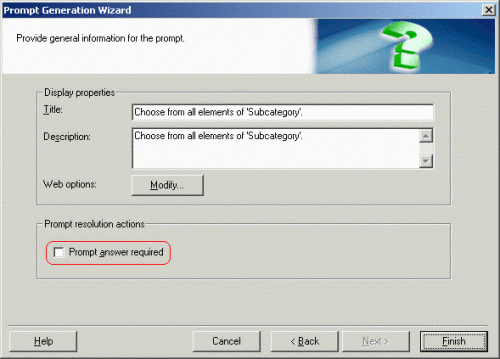
A prompt with this behavior can be built in Strategy Developer using the following steps. The steps here illustrate the technique for an attribute element prompt, but the same steps would apply to any type of prompt:

NOTES:
It is important that the prompt be technically optional according to the 'Prompt answer required' checkbox. For this type of prompting, the answer requirement should be implemented using the minimum number of answers, but not the 'required' status.
Consult the following Strategy Knowledge Base technical note for more details on configuring Access Control Lists:
KB4409 - The Object Access Control List in Strategy 9.2.x - 9.4.x.
13852
