EducationSoftwareStrategy.com
StrategyCommunity

Knowledge Base

Product

Community

Knowledge Base

TopicsBrowse ArticlesDeveloper Zone

Product

Download SoftwareProduct DocumentationSecurity Hub

Education

Tutorial VideosSolution GalleryEducation courses

Community

GuidelinesGrandmastersEvents
x_social-icon_white.svglinkedin_social-icon_white.svg
Strategy logoCommunity

© Strategy Inc. All Rights Reserved.

LegalTerms of UsePrivacy Policy
  1. Home
  2. Topics

KB13885: Project Access tab in User Editor shows how users acquired privileges in MicroStrategy Developer 9.4.1 and 10.x


Stefan Zepeda

Salesforce Solutions Architect • Strategy


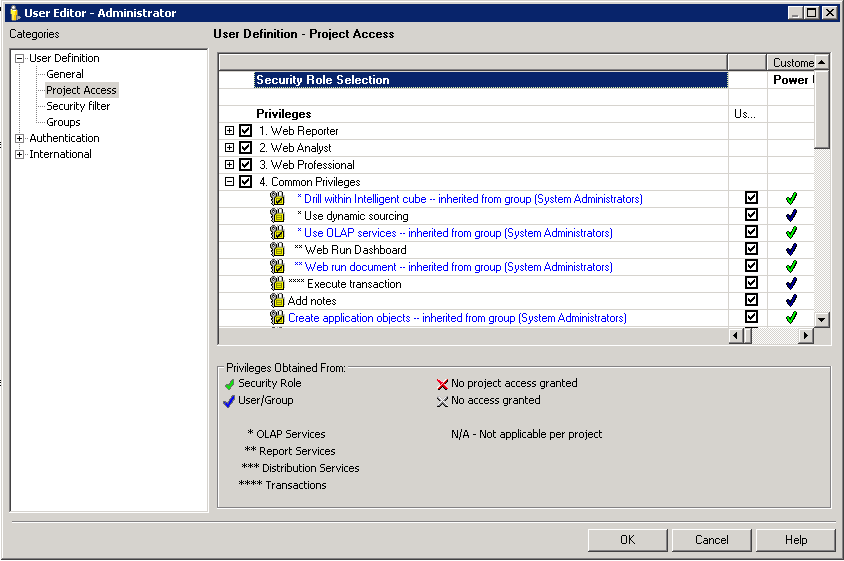
Project Access tab in User Editor shows how users acquired privileges in MicroStrategy Developer 9.4.1 and 10.x

In Strategy Developer 9.4.1 and 10.x, administrators can edit a user and go to the Project Access tab in the User Editor to see where the user acquired their privileges from. This tab details how the privilege is inherited with detailed information about the group it is inheriting from, as shown below:
ka044000000kJV5AAM_0EM440000002LL0.png

 
User's can also use Strategy License Manager 9.4.1 and 10.x to see which user is using what privilege and how they acquired it.
 
KB13885


Comment

0 comments

Details

Knowledge Article

Published:

May 9, 2017

Last Updated:

December 29, 2018