As of Strategy 9.x, data sources consisting of flat text files are supported for Strategy reporting, using the Strategy ODBC Driver for Text that is shipped with Strategy products. This driver is manufactured by DataDirect Technologies and shipped with Strategy 9.x and newer.
NOTE: Text databases are not supported as a primary data source for reporting; nor are they supported for production. Support is provided for Freeform SQL and Query Builder reports as part of Strategy's Extended Data Access (XDA) feature set.
NOTE: The "Certified and Supported Configurations" section of the Readme for the Strategy 9.x release indicates that text files are supported for warehouse use in Windows. However, the DataDirect ODBC Driver for Text did not ship with this version. It is now shipped with Strategy 9.x.
File structure
Since Open Database Connectivity (ODBC) is based on the Structured Query Language (SQL) standard, flat text files must be configured to behave like relational database tables against which SQL statements will be composed. A text-based ODBC data source may contain multiple tables, and the table name referenced in SQL may be different from the name of its corresponding file.
The following requirements must be met:
Complete instructions for configuring a text data source may be found in the Strategy Advanced Reporting PDF manual, in the section Creating Freeform SQL and Query Builder Reports -> Freeform SQL -> Creating Freeform SQL Reports -> Creating a Freeform SQL Report from a Text File.
Table definition parameters (column names and data types) are stored in a property file named QETXT.INI in the same directory as the data files. This file contains a list of the defined tables, along with the file name to which they refer, as well as table parameters as shown in the example below:
odbc-text.txt=Test -- Filename=Tablename
lu_a.txt=lu_a
lu_b.txt=lu_b
FILE=odbc-text.txt
FLN=1 -- Column names in first line
TT=Comma
Charset=ANSI
DS=
FIELD1=A_ID,NUMERIC,4,0,4,0, --Column_name,Datatype,precision,scale,length,offset
FIELD2=A_DESC,VARCHAR,6,0,6,0,
FIELD3=B_ID,NUMERIC,4,0,4,0,
FIELD4=B_DESC,VARCHAR,6,0,6,0,
FIELD5=FACT,NUMERIC,4,0,4,0,
FILE=lu_a.txt
FLN=1
TT=Comma
Charset=ANSI
DS=
FIELD1=A_ID,NUMERIC,4,0,4,0,
FIELD2=A_DESC,VARCHAR,10,0,10,0,
FILE=lu_b.txt
FLN=1
TT=Comma
Charset=ANSI
DS=
FIELD1=B_ID,NUMERIC,4,0,4,0,
FIELD2=B_DESC,VARCHAR,13,0,13,0,
Complete documentation on the configuration of a text database for ODBC is available on DataDirect's website:
http://media.datadirect.com/download/docs/odbc/allodbc/wwhelp/wwhimpl/js/html/wwhelp.htm
Troubleshooting configuration issues
Configuration of tables in a text DSN is greatly simplified by including the column names as the first line of the source file. The dialog box to configure the table in the ODBC Administrator includes a checkbox to specify whether the column names are present in the first line as shown in the image below; however, this box is unchecked by default. Defining the table with this checkbox incorrectly set will result in columns named FIELD1, FIELD2 etc., which may result in SQL execution and data integrity problems.
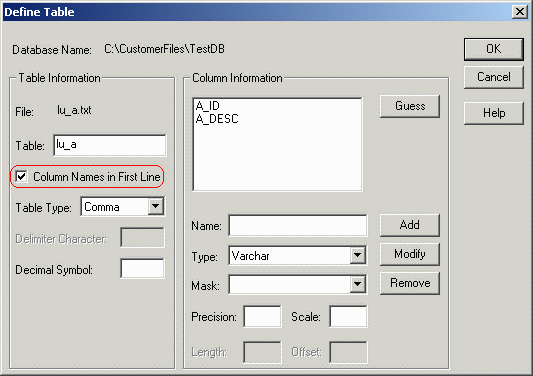
If the QETXT.INI file is missing or damaged, the driver will attempt to search for the data files based on the table name. If the file name differs from the table name, the result will be an error such as the following:
SQL Statement: select * from no_table
Execute Query failed. Error type: Odbc error. Odbc operation attempted: SQLExecDirect. Cannot open file 'C:\CUSTOMERFILES\TESTDB\NO_TABLE'.
If the table name in SQL is the same as the file name, data will be returned; however, in the absence of a valid table definition, the column names and data types may be incorrect. For result to come back, either the filename must have no extension, or the file extension must be referenced in the SQL statement. Otherwise, the error will be returned that the file "PATH\TABLENAME" could not be opened, even though a file named TABLENAME.TXT may in fact exist in the directory.
SQL support
The SQL implementation in the Text data source has some restrictions. The following constructions are not supported:
The CREATE TABLE syntax requires data types that differ from Strategy's standard data type mappings. Hence, Strategy multipass SQL is not supported against flat file data sources.
Because derived tables are not supported and Strategy Freeform SQL or Query Builder reports may comprise at most one pass, it is not supported to perform aggregation at multiple levels in the same report against a text data source. The data source must include pre-aggregated data to perform this kind of analysis.
A complete description of SQL syntax supported by DataDirect flat file ODBC drivers may be found on DataDirect's website:
http://media.datadirect.com/download/docs/odbc/allodbc/wwhelp/wwhimpl/js/html/wwhelp.htm
