EducationSoftwareStrategy.com
StrategyCommunity

Knowledge Base

Product

Community

Knowledge Base

TopicsBrowse ArticlesDeveloper Zone

Product

Download SoftwareProduct DocumentationSecurity Hub

Education

Tutorial VideosSolution GalleryEducation courses

Community

GuidelinesGrandmastersEvents
x_social-icon_white.svglinkedin_social-icon_white.svg
Strategy logoCommunity

© Strategy Inc. All Rights Reserved.

LegalTerms of UsePrivacy Policy
  1. Home
  2. Topics

KB13998: ‘You do not have access to any database instance’ error occurs when trying to use Freeform SQL Editor in MicroStrategy Developer 9.x and 10.x


Stefan Zepeda

Salesforce Solutions Architect • Strategy


KB13998: ‘You do not have access to any database instance’ error occurs when trying to use Freeform SQL Editor in MicroStrategy Developer 9.x and 10.x

SYMPTOM:
Users get the following error when trying to use the Freeform SQL Editor in Strategy Developer 9.x and 10.x:
 
You do not have access to any database instance
CAUSE:
One reason why this error occurs is that the 'Everyone' user group has only Custom (Browse) privileges to the database instance object to be used in the Freeform SQL Editor.
 
ACTION:
Give 'View' privileges to the database instance object for the appropriate user or group or to the 'Everyone' group. Follow the steps below:
 

  • From the Strategy Desktop 8.x Folder List, expand Administration and select Database Instance Manager. Right-click on the database instance object that is being used in the Freeform SQL Editor and choose Properties, as shown below:
ka02R000000kXHqQAM_0EM440000002FT6.jpeg
  • Click on the Security tab on the Properties window, as shown below:
ka02R000000kXHqQAM_0EM440000002FSu.jpeg
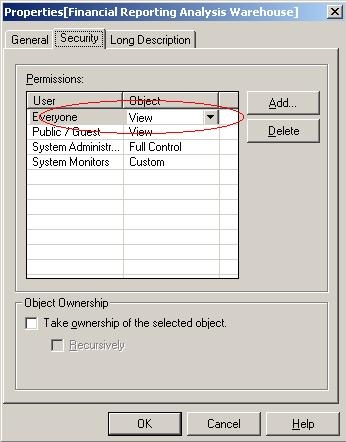
  • Make sure that the 'Everyone' group has at least 'View' privileges, as shown below:
ka02R000000kXHqQAM_0EM440000002FSi.jpeg
  •  
    If not, click on the Add button and add it to the list, as shown below:
     
ka02R000000kXHqQAM_0EM440000002FT5.jpeg


Comment

0 comments

Details

Knowledge Article

Published:

June 19, 2017

Last Updated:

June 19, 2017