EducationSoftwareStrategy.com
StrategyCommunity

Knowledge Base

Product

Community

Knowledge Base

TopicsBrowse ArticlesDeveloper Zone

Product

Download SoftwareProduct DocumentationSecurity Hub

Education

Tutorial VideosSolution GalleryEducation courses

Community

GuidelinesGrandmastersEvents
x_social-icon_white.svglinkedin_social-icon_white.svg
Strategy logoCommunity

© Strategy Inc. All Rights Reserved.

LegalTerms of UsePrivacy Policy
  1. Home
  2. Topics

KB14002: How to deny access to a MicroStrategy project to a user or user group in MicroStrategy Developer 10.x


Stefan Zepeda

Salesforce Solutions Architect • Strategy


KB14002: How to deny access to a MicroStrategy project to a user or user group in MicroStrategy Developer 10.x

The access to a single project in a project source can be denied or modified by using a Security Role.
 
Consider an example where the administrator would like to deny access to the Strategy Tutorial project for the 'Test' user from the Everyone Group, as shown below:
 

ka02R000000kVaTQAU_0EM440000002FU5.jpeg

 
To completely deny access to a group or a user, follow the steps below:
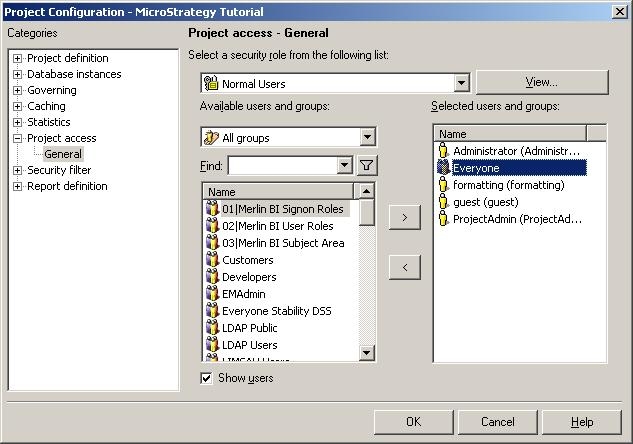
 

  • Right-click on the project and choose Project Configuration -> Project Access.
  • Select the 'Normal Users' security role. Remove the 'Everyone' group from the 'Security Role,' as shown below:
ka02R000000kVaTQAU_0EM440000002FUC.jpeg
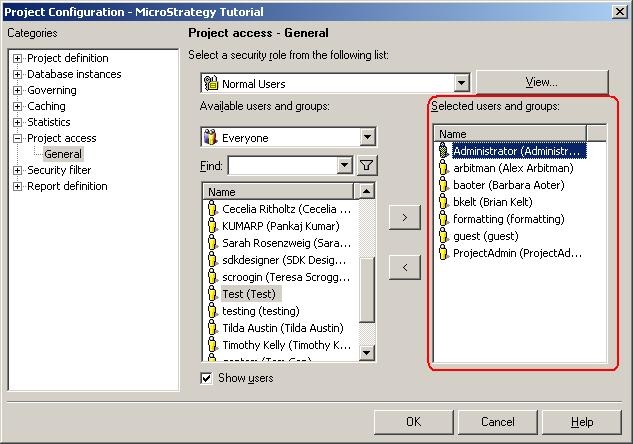
  • Add the user groups that have access to the project one by one. To see the users contained in each user group, highlight the group and check the 'Show users' check box.
  • The user group or user for whom the access to the project is going to be restricted or denied should NOT be found in the 'Selected users and groups' section, which is highlighted below:
ka02R000000kVaTQAU_0EM440000002FU9.jpeg
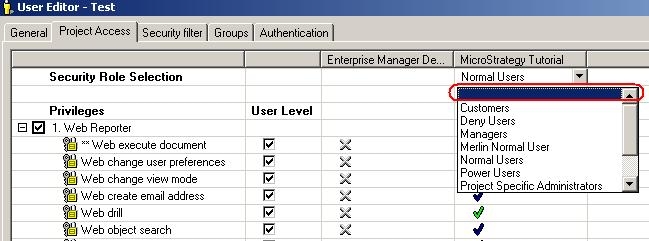
  • Now edit the user 'Test' and go to Project Access. Make sure that no security role is associated with this user, as shown below, and save the changes:
ka02R000000kVaTQAU_0EM440000002FU7.jpeg
  • Now try logging in as the 'Test' user and the following message will appear:
ka02R000000kVaTQAU_0EM440000002FUG.jpeg
  •  
    No projects were returned by this project source

Comment

0 comments

Details

Knowledge Article

Published:

May 31, 2017

Last Updated:

May 31, 2017