EducationSoftwareStrategy.com
StrategyCommunity

Knowledge Base

Product

Community

Knowledge Base

TopicsBrowse ArticlesDeveloper Zone

Product

Download SoftwareProduct DocumentationSecurity Hub

Education

Tutorial VideosSolution GalleryEducation courses

Community

GuidelinesGrandmastersEvents
x_social-icon_white.svglinkedin_social-icon_white.svg
Strategy logoCommunity

© Strategy Inc. All Rights Reserved.

LegalTerms of UsePrivacy Policy
  1. Home
  2. Topics

KB14009: In a clustered MicroStrategy Intelligence Server 9.x-10.x environment, Cache Hit Count or the Last Hit Time of a cache on the local node is not changed when the cache is hit from a remote node


Community Admin

• Strategy


SYMPTOM:
In a clustered Strategy Intelligence Server 9.x-10.x environment, Cache Hit Count or the Last Hit Time of a cache on the local node is not changed when the cache is hit from a remote node.
 
 
STEPS TO REPRODUCE:
Follow the steps below to reproduce this issue using the Strategy Tutorial project:
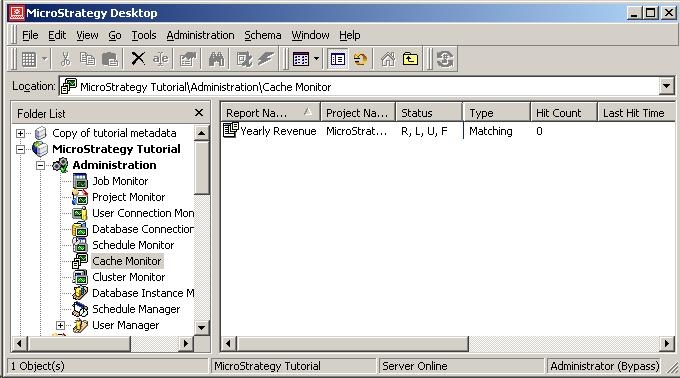
 

  • Login to node 1 of the cluster and execute a report. A cache is created as displayed in the Cache Monitor, as shown below:
ka04W000000OeXYQA0_0EM440000002BcM.jpeg
  •  
    This clearly shows that the cache for the report 'Yearly Revenue' has been created. The Hit Count is presently 0 and there isn't any Last Hit Time yet, as this cache has not been hit yet.
     
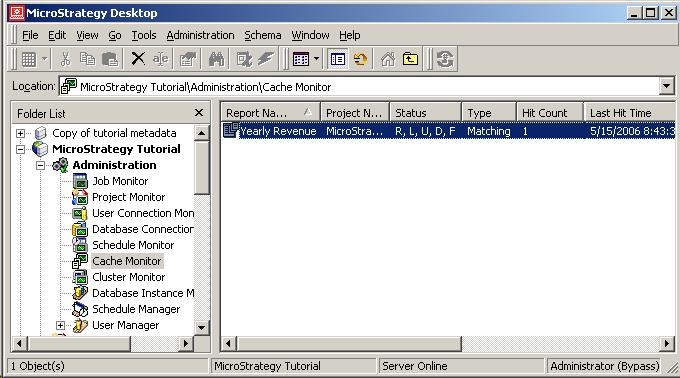
  • From the same node, execute the report again. It will hit the cache and the Hit Count and Last Hit Time are updated, as shown below:
ka04W000000OeXYQA0_0EM440000002BcX.jpeg
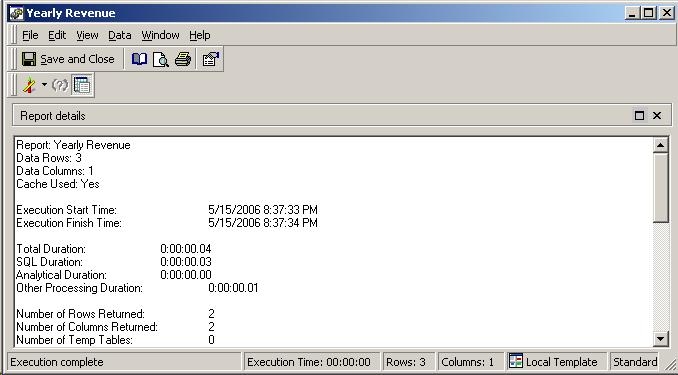
  • Now, login to node 2 of the cluster. Again, execute the same report. After executing the report, go to the SQL view of this report. It clearly shows that the report did hit the cache, as shown below:
ka04W000000OeXYQA0_0EM440000002BcQ.jpeg
  • However, even after confirming that the report did hit the cache from node 2 and refreshing the cache monitor on node 1, the Hit Count or the Last Hit Time are not updated, as shown below:
ka04W000000OeXYQA0_0EM440000002BcX.jpeg

CAUSE:
This is the designed behavior in Strategy Developer and Intelligence Server 9.x-10.x.
 
ACTION:
In order to verify that the report did hit the cache from node 2, check the SQL view of the report as shown above. This will indicate whether the cache was used or not when executing the report. Strategy Enterprise Manager project can also be used to see whether or not the report cache was hit accurately.
 
KB14009


Comment

0 comments

Details

Knowledge Article

Published:

June 9, 2017

Last Updated:

June 9, 2017