EducationSoftwareStrategy.com
StrategyCommunity

Knowledge Base

Product

Community

Knowledge Base

TopicsBrowse ArticlesDeveloper Zone

Product

Download SoftwareProduct DocumentationSecurity Hub

Education

Tutorial VideosSolution GalleryEducation courses

Community

GuidelinesGrandmastersEvents
x_social-icon_white.svglinkedin_social-icon_white.svg
Strategy logoCommunity

© Strategy Inc. All Rights Reserved.

LegalTerms of UsePrivacy Policy
  1. Home
  2. Topics

KB14031: How can a database other than the project default warehouse be used for authentication in MicroStrategy Intelligence Server?


Community Admin

• Strategy


user logins can be authenticated against databases on a per project basis from any database instance. Users can also use their login credentials for linked login during warehouse execution against multiple database instances. This technical note documents the steps users must take to take advantage of this functionality.

SUMMARY:
In Strategy, user logins can be authenticated against databases on a per project basis from any database instance. Users can also use their login credentials for linked login during warehouse execution against multiple database instances. This technical note documents the steps users must take to take advantage of this functionality.
EXAMPLE:
Authentication against the Intelligence Server:
The Strategy Intelligence Server provides a number of means for users to authenticate themselves to the Intelligence Server. One of these methods is database authentication, in which the Intelligence Server authenticates the user attempting to access the metadata against a database. the steps involved in setting up this configuration are as follows:
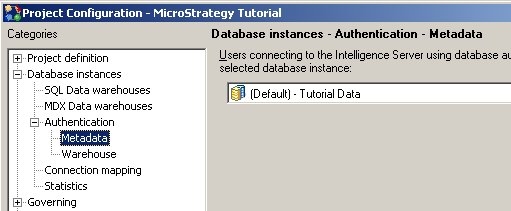

  • The database instance that will be used to authenticate users for the project must be selected in the Project Configuration -> Database Instances -> Authentication -> Metadata tab, as shown below:
ka04W000000OeFQQA0_0EM440000002BcV.jpeg
  •  
    Only one database instance can be used per project for database authentication.
     
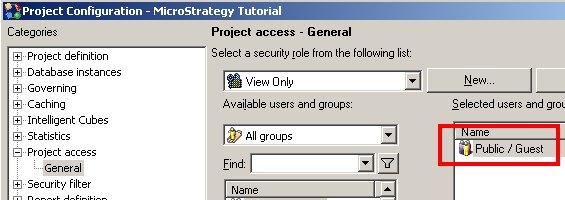
  • Since the database that is to be used for authentication is provided at a Project level, users using database authentication to login, will establish a "guest" session with the Intelligence Server. To enable this, the Public/Guest account must be given connect privileges to the Intelligence Server.
ka04W000000OeFQQA0_0EM440000002BcO.jpeg
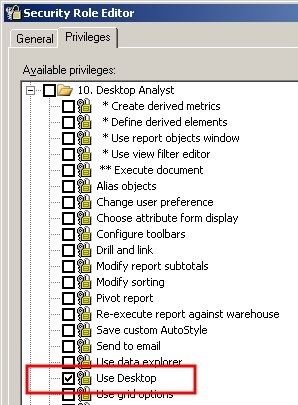
  • Additionally, once the user guest session is created with the Intelligence Server, the users will only be able to view projects that have the Public/Guest group provided with the privilege to "Use Desktop" as shown below:
ka04W000000OeFQQA0_0EM440000002BcW.jpeg
ka04W000000OeFQQA0_0EM440000002BcI.jpeg
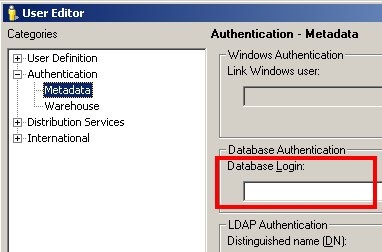
  • The login used when authenticating against the database is specified for users in the authentication tab of the User Editor illustrated below. This information is needed to locate the Strategy user when the warehouse username and password are provided for authentication. : 
     
ka04W000000OeFQQA0_0EM440000002BcP.jpeg
  • If no Warehouse Passthrough login information is provided for a user, then the user will only be able to gain the following access the project using Database Authentication:
    • Users without a valid database user name and password will be able to gain "guest" access to the Intelligence Server, but no access to projects.
       
    • Users with a valid database user name and password but no warehouse login information persisted in the Strategy metadata for the user will receive an error message related to the required privileges ('You do not have access privilege to project '<Project Name>').
       
    • Users with a valid database user name and password and warehouse login information persisted for the user will be logged in to the Intelligence Server as guest and to the project as themselves with full access to their profile folders, history list etc.
       
  • The information provided by the user when logging into Strategy can also be used to authenticate the user agains the warehouse during query execution. This functionality is known as Warehouse passthrough. The steps to implement this behavior are detailed in the following section.

 
Warehouse Execution for report or document execution:
In addition to authentication against the Intelligence Server / Strategy metadata, it is possible to specify the authentication for a user used during report or document execution against the warehouse. These credentials are used to connect to the warehouse to run queries, independently of whether the user authenticated against the Intelligence Server using database authentication or some other method.
By default, if the user is mapped to the warehouse through a connection map, the mapped credentials are used to authenticate the user against the warehouse. Users can however,  chose to use the credentials provided when logging in using database authentication (the linked login - also called 'pass through authentication') for authentication during report or document execution. Users may follow the steps below to configure the project for linked authentication during execution: 
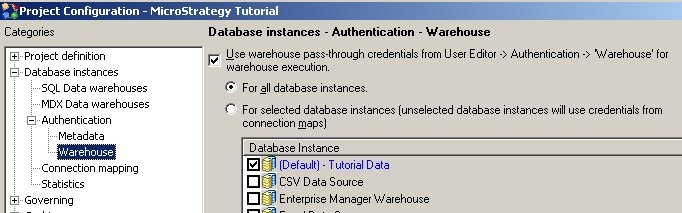
  • With Strategy, users can select multiple database instances for which the linked login can be used, as shown below. If the option to 'Use warehouse passthrough...' is not checked, the linked login is not used for execution, and the default project connection map is used instead:
ka04W000000OeFQQA0_0EM440000002BcN.jpeg
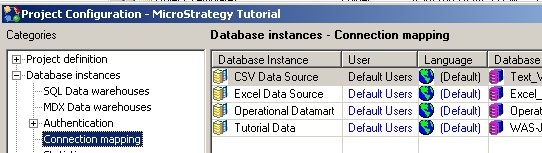
  • When executing against a database that is not selected to use the linked login, the default behavior is to use the default database login for that instance. This can be specified in the connection map dialog box, as shown below:
ka04W000000OeFQQA0_0EM440000002BcS.jpeg
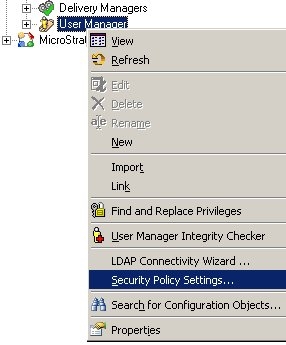
  • Further, because scheduled reports and documents (subscriptions) are run without user interaction, users need to persist the database password in the metadata for the user to ensure that the Intelligence Server can execute the jobs against the warehouse. From Strategy 9.x and newer versions, users can choose to have their database authentication credentials automatically persisted in the metadata after they enter them at login time by manipulating the security policy settings:
ka04W000000OeFQQA0_0EM440000002BcR.jpeg
  •  Users should note that pass-through authentication for subscriptions against XMLA data sources will not succeed as documented in the technical note: KB32317 "Reports against Microsoft Analysis Services do not use end user credentials when subscribed for delivery in Strategy Distribution Services 9.0 when Integrated Authentication is used"

Comment

0 comments

Details

Knowledge Article

Published:

June 12, 2017

Last Updated:

June 12, 2017