SYMPTOM:
Strategy Intelligence Server takes a long time to shutdown. This behavior is particularly noticable when there are a large number of projects loaded on the Intelligence Server. A long time for unloading projects may also be observed.
CAUSE:
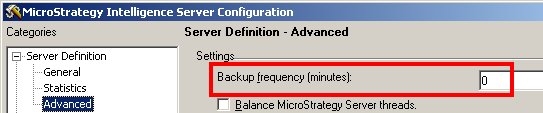
A possible reason for this issue could be a non-zero value specified for the backup frequency in the Strategy Intelligence Server Configuration. One of the threads within the Strategy Intelligence Server process is the cache backup thread which handles the backup of caches to disk. The cache backup thread is inactive for a fixed time and activates after this interval to backup the caches.
NOTE: The Cache Backup Frequency setting also affects the time it takes to unload a project.
ACTION:
This is working as designed. When a non-zero value is specified for the cache backup frequency, the cache backup thread will wait for a short interval of time before checking its status. So depending on the number of projects, the cumulative time for unload or shutdown may still be significant.
WORKAROUND:
Users can workaround this issue by setting the value for the Cache Backup Frequency to 0 in the Strategy Intelligence Server Configuration -> Server Definition -> Advanced, as shown below: