EducationSoftwareStrategy.com
StrategyCommunity

Knowledge Base

Product

Community

Knowledge Base

TopicsBrowse ArticlesDeveloper Zone

Product

Download SoftwareProduct DocumentationSecurity Hub

Education

Tutorial VideosSolution GalleryEducation courses

Community

GuidelinesGrandmastersEvents
x_social-icon_white.svglinkedin_social-icon_white.svg
Strategy logoCommunity

© Strategy Inc. All Rights Reserved.

LegalTerms of UsePrivacy Policy
  1. Home
  2. Topics

KB14047: How to turn off subtotals for derived metrics in MicroStrategy Developer


Stefan Zepeda

Salesforce Solutions Architect • Strategy


SYMPTOM:
When a user creates a report with a derived metric and subtotals in Strategy Developer, the derived metric shows subtotals by default, as shown below:
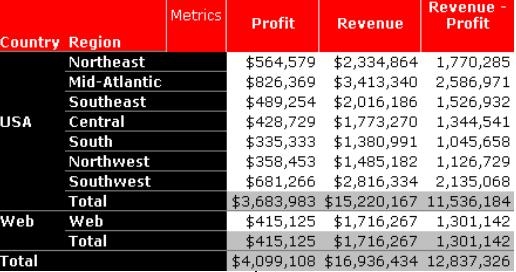
 

ka04W00000148zrQAA_0EM440000002FTi.jpeg

 
CAUSE:
This is working per design. The subtotals should appear by default. Note that derived metrics do not have a Subtotal/Aggregation tab to modify the totaling behavior.
 
ACTION:
To remove the derived metric subtotals, follow the steps below:
 

  • In the Report editor go to Data -> Subtotals.
  • Click on the 'Advanced' button of the Subtotals window.
  • Click on 'New' to create a new subtotal.
  • On the Custom Subtotal Properties window, write a name for the new subtotal.
  • Click on the Subtotal drop down list for the derived metric and select (None), as shown below:
ka04W00000148zrQAA_0EM440000002FTf.jpeg
  • Make sure that the rest of the metrics have the proper function assigned.
  • Click on the 'OK' button.
  • Add the new subtotal to the report and click 'OK', as shown below:
ka04W00000148zrQAA_0EM440000002FTW.jpeg
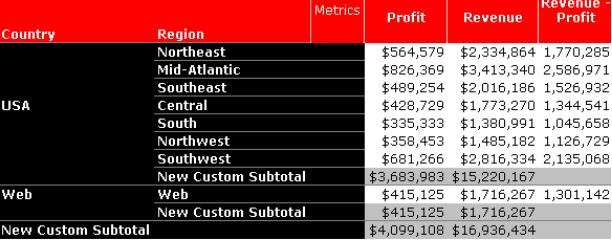
  • The report will reflect the changes and the subtotal for the derived metric will not be shown., as shown below:
ka04W00000148zrQAA_0EM440000002FTY.jpeg

Comment

0 comments

Details

Knowledge Article

Published:

May 24, 2017

Last Updated:

July 27, 2023