SYMPTOM:
Full Control permissions are systematically given to the users for their own profile folder. User profile folders are stored under a hidden parent folder called "Profiles." If an Administrator changes the ACL for the main 'Profiles' folder, with 'Override Children's ACL' and 'Recursively' options selected, all the users will lose their Full Control permission on their 'My Personal Objects' folder in Strategy Developer 10.x. All individual profile folders will now reflect the ACL of the parent "Profile" folder.
CAUSE:
Each user has Full Control over their profile folder inside the 'Profiles' folder in Strategy Developer 10.x. When the 'Recursively' option, shown below, is applied in the parent folder, the same rule is applied as in any other folder, and each user folder will acquire the same permissions as the parent folder and the user will not be able to see their folders.

ACTION:
Each user's folder must be changed to give each user Full Control over their folder, as shown below:
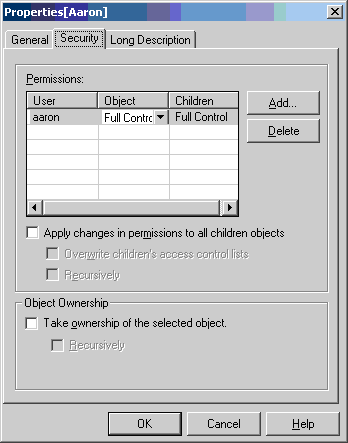
There are two ways to do this:
Strategy Command Manager scripting is highly recommended for large amounts of users.
