EducationSoftwareStrategy.com
StrategyCommunity

Knowledge Base

Product

Community

Knowledge Base

TopicsBrowse ArticlesDeveloper Zone

Product

Download SoftwareProduct DocumentationSecurity Hub

Education

Tutorial VideosSolution GalleryEducation courses

Community

GuidelinesGrandmastersEvents
x_social-icon_white.svglinkedin_social-icon_white.svg
Strategy logoCommunity

© Strategy Inc. All Rights Reserved.

LegalTerms of UsePrivacy Policy
  1. Home
  2. Topics

KB14100: In MicroStrategy Developer 9.4.x-10.x, grid reports in outline mode placed in a Report Services document do not appear in outline mode when exported to PDF


Stefan Zepeda

Salesforce Solutions Architect • Strategy


This knowledge base article documents that grid reports in outline mode placed in a Report Services document do not appear in outline mode when exported to PDF in MicroStrategy Developer 9.4.x-10.x.

SYMPTOM:
Grid reports in outline mode that are place in a Report Services document do not appear in outline mode when exported to PDF mode in Strategy Developer 9.4.x-10.x.
 
STEPS TO REPRODUCE:
Follow the steps below to reproduce the issue in the Strategy Tutorial project:
 

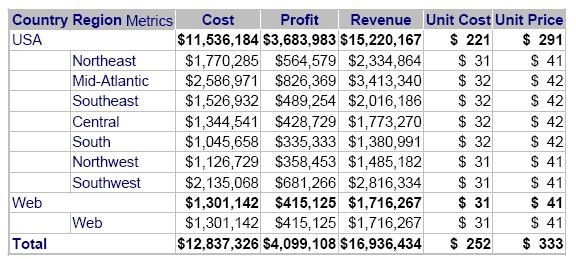
  • Create a report with Country, Region, Revenue, Cost, Profit, Unit Cost, and Unit Price.
  • Enable Subtotals and Outline Mode.
  • Execute the report, as shown below:
ka02R000000kYRQQA2_0EM440000002FTh.jpeg
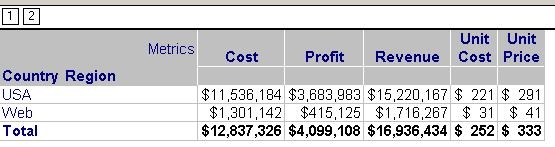
  • Now place this grid report inside a Report Services document.
  • Execute the document and the grid report does not show up in Outline Mode, as shown below:
ka02R000000kYRQQA2_0EM440000002FTo.jpeg

CAUSE:
An Enhancement Request has been logged to allow the usage of the outline mode in report placed into Report Services Documents.
 
ACTION:
Contact Strategy Technical Support for an update on the status of this enhancement.


Comment

0 comments

Details

Knowledge Article

Published:

June 8, 2017

Last Updated:

June 8, 2017