In Strategy Narrowcast Server, there are two "Intelligence Server Cache" settings for Information Objects, as shown below:
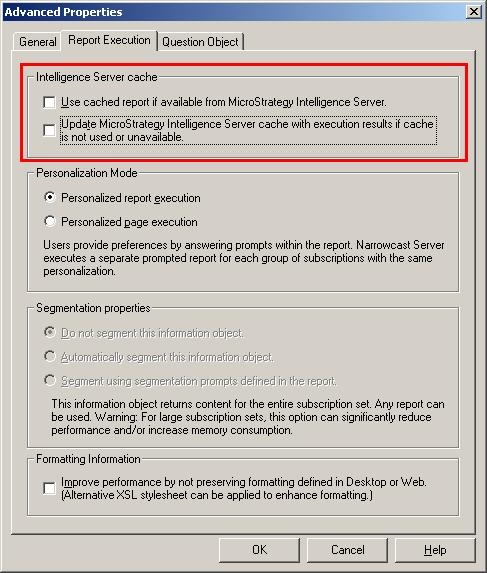
The options will govern what happens for Information Objects in services depending on the combination that is selected. Consider the following six possible scenarios with an Information Object called 'Test IO Report' that maps to a report called 'TestIO' and what happens with the cache:
Scenario 1:
Use cached report if available from Strategy Intelligence Server: Yes
Update Strategy Intelligence Server cache with execution result if cache is not used or unavailable: No
Cache present: No
--No cache is present on Strategy Intelligence Server, so the report will be executed against the data warehouse and the results will be sent back to Strategy Narrowcast Server. A cache will not be saved on Strategy Intelligence Server.
Scenario 2:
Use cached report if available from Strategy Intelligence Server: Yes
Update Strategy Intelligence Server cache with execution result if cache is not used or unavailable: No
Cache present: Yes
--The cache exists on Strategy Intelligence Server so the results will be returned immediately to Strategy Narrowcast Server without any execution.
Scenario 3:
Use cached report if available from Strategy Intelligence Server: No
Update Strategy Intelligence Server cache with execution result if cache is not used or unavailable: Yes
Cache present: No
-- No cache is present on Strategy Intelligence Server, so the report will be executed against the data warehouse and the results will be sent back to Strategy Narrowcast Server. A cache will be saved on Strategy Intelligence Server for use by others accessing the report.
Scenario 4:
Use cached report if available from Strategy Intelligence Server: No
Update Strategy Intelligence Server cache with execution result if cache is not used or unavailable: Yes
Cache present: Yes
--Even though a cache exists in Strategy Intelligence Server, it will not be used. The report will be executed against the data warehouse and the results will be sent back to Strategy Narrowcast Server. However, the cache that was present on Strategy Intelligence Server at the time of execution will be updated with the results from this new report execution.
Scenario 5:
Use cached report if available from Strategy Intelligence Server: Yes
Update Strategy Intelligence Server cache with execution result if cache is not used or unavailable: Yes
Cache present: No
-- No cache is present on Strategy Intelligence Server, so the report will be executed against the data warehouse and the results will be sent back to Strategy Narrowcast Server. A cache will be saved on Strategy Intelligence Server for use by others accessing the report.
Scenario 6:
Use cached report if available from Strategy Intelligence Server: Yes
Update Strategy Intelligence Server cache with execution result if cache is not used or unavailable: Yes
Cache present: Yes
-- The cache exists on Strategy Intelligence Server so the results will be returned immediately to Strategy Narrowcast Server without any execution.
