SYMPTOM:
A user creates an attribute using an Apply Simple statement referring to the comparison of two tables in Strategy Desktop 8.x, as shown below:
ApplySimple(`case WHEN #0 > #1 THEN `Y` ELSE `N` END`, , )
The following error appears:

Invalid element value 'Y' for attribute 'LSAT HI Score Different' (form "). Expected value type is numeric.
CAUSE:
The form format in the attribute is not set to TEXT even if the tables contain date or numeric values.
ACTION:
Follow the steps below to resolve this issue:
1. Open the Attribute Editor and open the Apply Simple Expression.
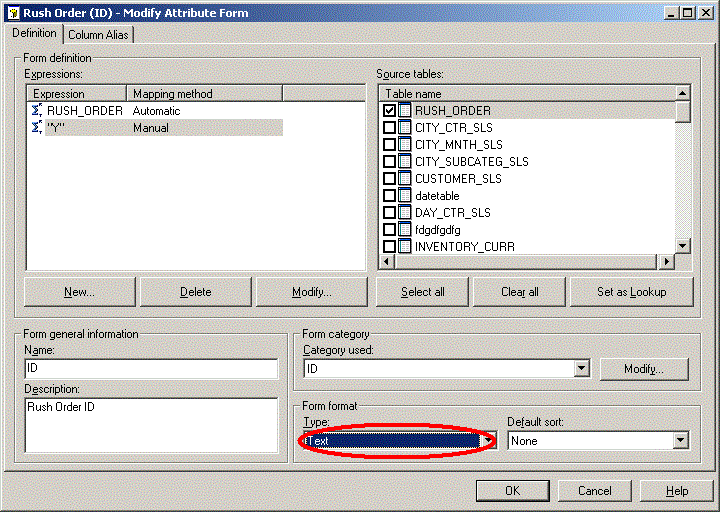
2. Edit the Form Format to TEXT, as shown below:
3. Click Yes and save the attribute when the following window appears:
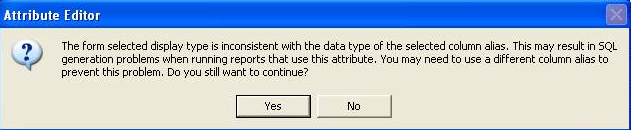
The form selected display type is inconsistent with the data type of the selected column alias. This may result in SQL generation problems when running reports that use this attribute. You may need to use a different column alias to prevent this problem. Do you still want to continue?
For more information about this message, refer to the following Strategy Knowledge Base technical note:
KB14102: ‘The form selected display type is inconsistent with the data type of the selected column alias. … You may need to use a different column ...’ message appears when changing an attribute form expression in MicroStrategy Developer 9.x - 10.x
