EducationSoftwareStrategy.com
StrategyCommunity

Knowledge Base

Product

Community

Knowledge Base

TopicsBrowse ArticlesDeveloper Zone

Product

Download SoftwareProduct DocumentationSecurity Hub

Education

Tutorial VideosSolution GalleryEducation courses

Community

GuidelinesGrandmastersEvents
x_social-icon_white.svglinkedin_social-icon_white.svg
Strategy logoCommunity

© Strategy Inc. All Rights Reserved.

LegalTerms of UsePrivacy Policy
  1. Home
  2. Topics

KB14141: How to exclude nulls and zeros using Average Subtotals without OLAP in MicroStrategy Developer


Stefan Zepeda

Salesforce Solutions Architect • Strategy


When trying to get an average on a metric aggregating the calculation level to an attribute that is not displayed in the grid, the table in the warehouse contains values equal to '0', and those values must not be taken to calculate the average. The ZeroToNull function can be used to take the '0' as a null value and the average can be calculated correctly using dynamic aggregation.

SYMPTOM:
When trying to get an average on a metric aggregating the calculation level to an attribute that is not displayed in the grid, the table in the warehouse contains values equal to '0', and those values must not be taken to calculate the average. The ZeroToNull function can be used to take the '0' as a null value and the average can be calculated correctly using dynamic aggregation and the Report objects window (an OLAP Services License is required) as shown below:
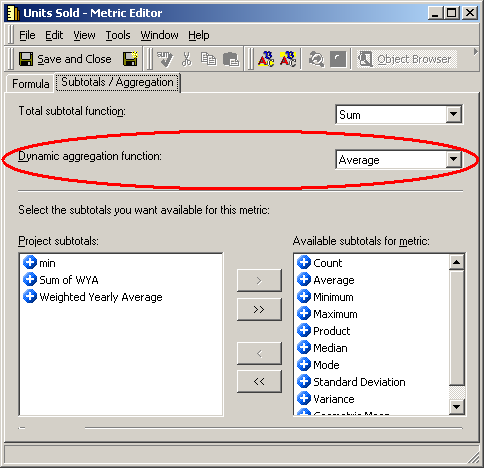
 

ka02R000000kXzLQAU_0EM440000002FNc.jpeg

 
If the ZeroToNull function is not used under these circumstances, the average is not calculated correctly, as shown below:
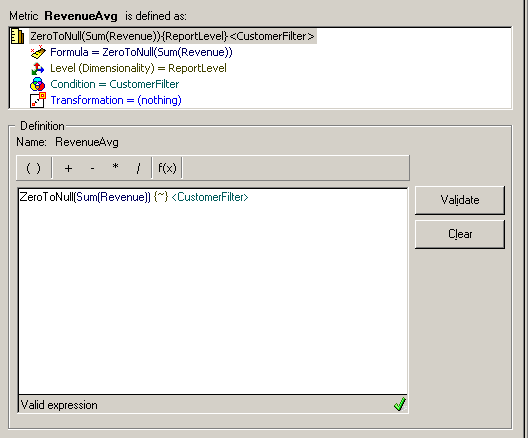
 

ka02R000000kXzLQAU_0EM440000002FNa.jpeg

 
For example, when using the following table, the average should be calculated as follows:
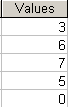
 

ka02R000000kXzLQAU_0EM440000002FNY.jpeg

 
Using ZeroToNull function:
 
(3+6+7+5)/4 = 21/4 = 5.25
Not using ZeroToNull function:
 
(3+6+7+5+0)/5 = 21/5 = 4.2
STEPS TO REPRODUCE:
Follow the steps below to reproduce this issue in the Strategy Tutorial project:
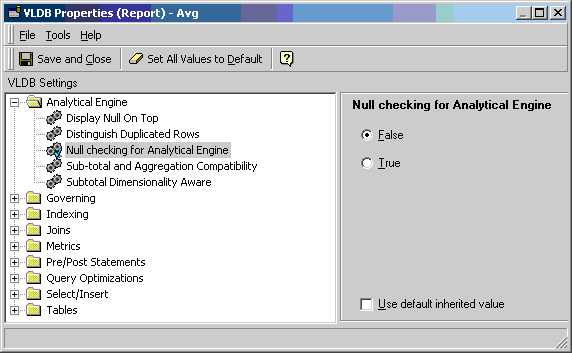
 

  • Using OLAP Services, create a metric that is the SUM of a fact. In the Subtotal tab, select AVG in the Dynamic Aggregation option. Use a table with zero values in the fact table in the Customer Level (users can add a zero to the Unit Sold Table.)
  • Add Customer State and Customer to the report. Execute the report and add a Subtotal (Average). Remove Customer from the grid and place it in the Report objects window.
  • Delete Customer from the report to recreate the Customer scenario without using OLAP. Now the Average Subtotal counts at the Customer State level.
  • The 'Null checking for Analytical Engine' option in the VLDB properties must be set to True:
ka02R000000kXzLQAU_0EM440000002FNe.jpeg
  • Refer to the following Strategy Knowledge Base technical note to define a subtotal that calculates an average based only on metric values greater than zero in Strategy Desktop 8.x 
  • How to define a subtotal that calculates an average based only on metric values greater than zero in Strategy Desktop 8.x

CAUSE:
This is a functionality of OLAP Services and dynamic aggregation with the lowest level calculation in the Report objects window. Without OLAP Services, the 0 is taken as a value and the ZeroToNull function will not work properly.
 
ACTION:
Replace the zero values in the DB Warehouse tables for Null values, as shown below:
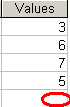
 

ka02R000000kXzLQAU_0EM440000002FNi.jpeg

 
The 'Null checking for Analytical Engine' option in the VLDB properties must be set to default (False).


Comment

0 comments

Details

Knowledge Article

Published:

June 12, 2017

Last Updated:

June 12, 2017