EducationSoftwareStrategy.com
StrategyCommunity

Knowledge Base

Product

Community

Knowledge Base

TopicsBrowse ArticlesDeveloper Zone

Product

Download SoftwareProduct DocumentationSecurity Hub

Education

Tutorial VideosSolution GalleryEducation courses

Community

GuidelinesGrandmastersEvents
x_social-icon_white.svglinkedin_social-icon_white.svg
Strategy logoCommunity

© Strategy Inc. All Rights Reserved.

LegalTerms of UsePrivacy Policy
  1. Home
  2. Topics

KB14220: How to grant users the ability to delete report caches from the Cache Monitor without being granted ‘Bypass All Object Security Access Checks’ privilege in MicroStrategy Developer 10.x


Stefan Zepeda

Salesforce Solutions Architect • Strategy


KB14220: How to grant users the ability to delete report caches from the Cache Monitor without being granted ‘Bypass All Object Security Access Checks’ privilege in MicroStrategy Developer 10.x

Administrators may want to grant the ability to certain users to be able to go into the Cache Monitor and delete caches but would like to avoid granting them the Administration privilege 'Bypass all object security access checks' in Strategy Develoepr 10.x.
 
To do so, users will need to take the following steps:
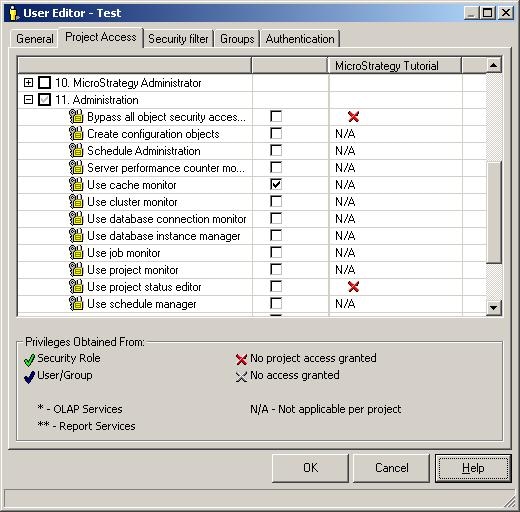
 

  • Grant the Test User the Administration Privilege 'Use cache monitor', as shown below:
ka02R000000kXH1QAM_0EM440000002FSe.jpeg
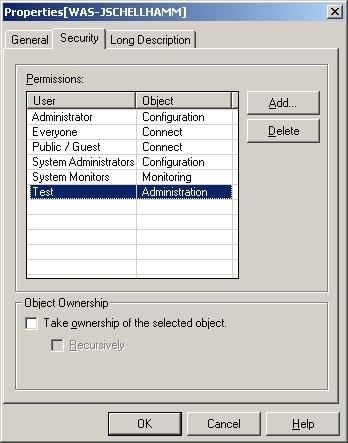
  • Right-click on the Administration icon that appears under the 3-tier project source and go to Properties.
  • Once there, go to the Security tab and grant the Test User Administration access, as shown below:
ka02R000000kXH1QAM_0EM440000002FSc.jpeg

Now, when the user logs in, they will only be able to see the Cache Monitor under Administration and will have the ability to delete any caches for any project, as shown below:
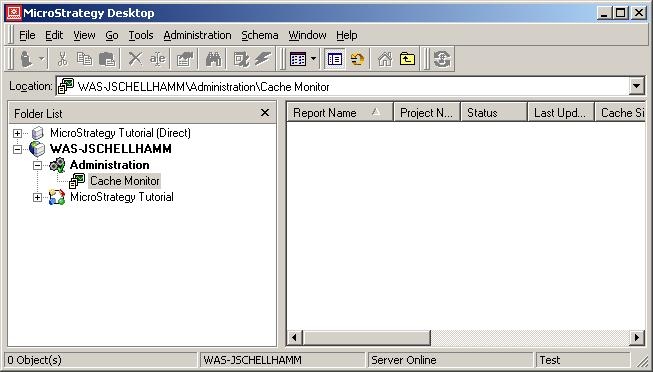
 

ka02R000000kXH1QAM_0EM440000002FSg.jpeg

 
For steps on how to grant individual viewing for other Monitors, view the following Strategy Knowledge technical note:
 
KB13706 (KB5700-8X-1955) - How to allow a user to view certain monitors in Strategy Desktop 8.x


Comment

0 comments

Details

Knowledge Article

Published:

June 19, 2017

Last Updated:

June 19, 2017