EducationSoftwareStrategy.com
StrategyCommunity

Knowledge Base

Product

Community

Knowledge Base

TopicsBrowse ArticlesDeveloper Zone

Product

Download SoftwareProduct DocumentationSecurity Hub

Education

Tutorial VideosSolution GalleryEducation courses

Community

GuidelinesGrandmastersEvents
x_social-icon_white.svglinkedin_social-icon_white.svg
Strategy logoCommunity

© Strategy Inc. All Rights Reserved.

LegalTerms of UsePrivacy Policy
  1. Home
  2. Topics

KB14231: Thresholds are not applied to all elements in a graph in MicroStrategy Developer 9.x and 10.x


Stefan Zepeda

Salesforce Solutions Architect • Strategy


Thresholds are not applied to all elements in a graph in MicroStrategy Developer 9.x and 10.x

SYMPTOM:
When creating a report to be shown in grid/graph or graph mode, the thresholds are not being applied to all the graph elements in Strategy Developer 9.x and 10.x.
 
STEPS TO REPRODUCE:
Follow the steps below to reproduce this issue in the Strategy Tutorial project:
 

  • Create a report.
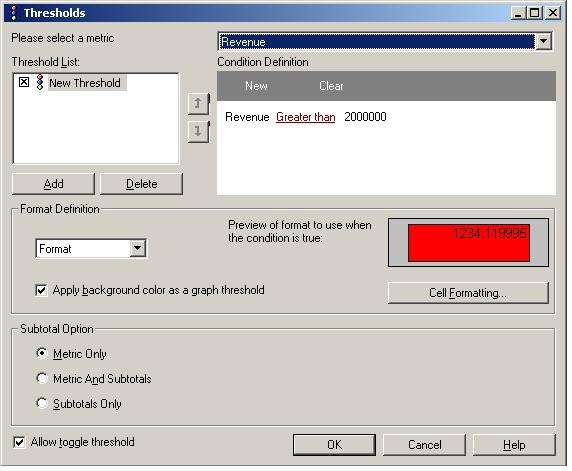
  • Add a format threshold and check the box 'Apply background color as a graph threshold' to enable the threshold functionality in graphs, as shown below:
ka02R000000kVauQAE_0EM440000002FSY.jpeg
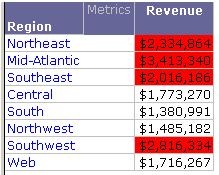
  • Execute the report and select a grid/graph or graph view. The grid will show the correct thresholds, however, only the first graph element will have the threshold applied, as shown below:
ka02R000000kVauQAE_0EM440000002FSf.jpeg

CAUSE:
This is a limitation in Strategy Desktop 9.x.
 
WORKAROUND:
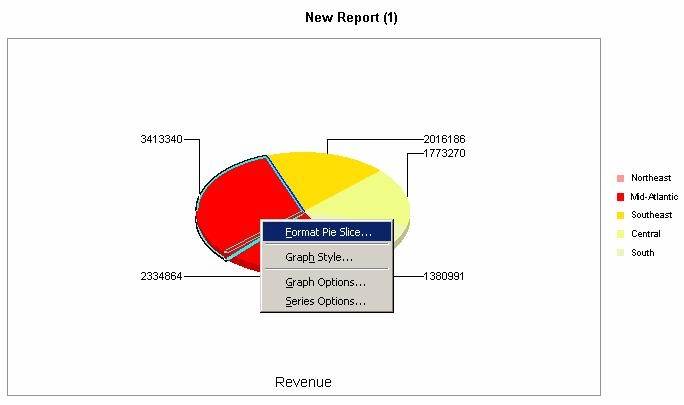
Users can modify the colors of the pie slices manually, as shown below:
 

ka02R000000kVauQAE_0EM440000002FSZ.jpeg


Comment

0 comments

Details

Knowledge Article

Published:

May 31, 2017

Last Updated:

May 31, 2017