EducationSoftwareStrategy.com
StrategyCommunity

Knowledge Base

Product

Community

Knowledge Base

TopicsBrowse ArticlesDeveloper Zone

Product

Download SoftwareProduct DocumentationSecurity Hub

Education

Tutorial VideosSolution GalleryEducation courses

Community

GuidelinesGrandmastersEvents
x_social-icon_white.svglinkedin_social-icon_white.svg
Strategy logoCommunity

© Strategy Inc. All Rights Reserved.

LegalTerms of UsePrivacy Policy
  1. Home
  2. Topics

KB14240: Users are unable to search for a value in a prompt that contains a double quote (‘’) in MicroStrategy Web 9.x and 10.x


Community Admin

• Strategy


KB14240: Users are unable to search for a value in a prompt that contains a double quote (‘’) in MicroStrategy Web 9.x and 10.x

SYMPTOM:
In Strategy Web 9.x and 10.x, users cannot search for a value in a prompt that contains a double quote ('').
 
STEPS TO REPRODUCE:
Follow the steps below to reproduce the issue in the Strategy Tutorial project:
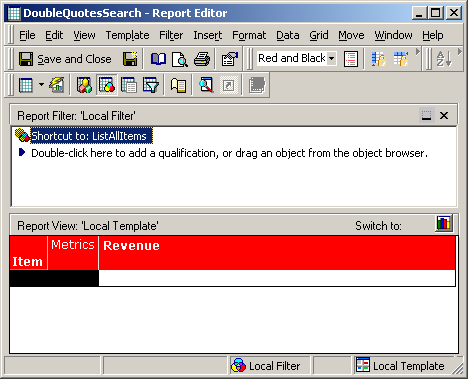
 

  • In Strategy Web 9.x, create an attribute element list prompt (ListAllItems) on the Item attribute with the 'List all elements (no restriction)' option checked.
  • Create a report with the Item attribute, the Revenue metric, and the ListAllItems prompt (created in step # 1), as shown below:
ka04W000000OcaXQAS_0EM4400000028rq.jpeg
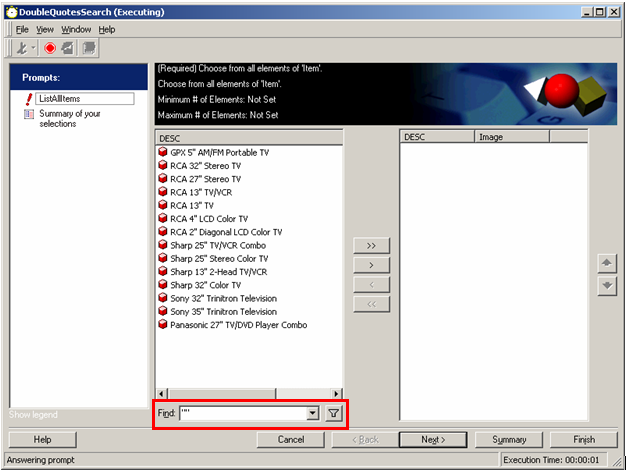
  • Execute the report in Strategy Developer 9.x and 10.x. When prompted, do a search on "" and it will return some attribute elements with double quotes, as shown below:
ka04W000000OcaXQAS_0EM4400000028rj.jpeg
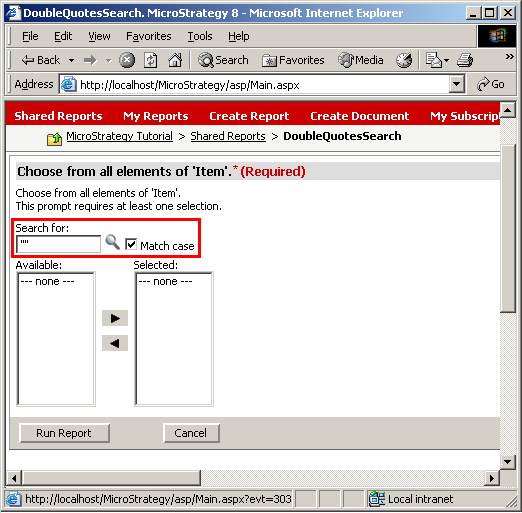
  • Execute this same report in Strategy Web 9.x and 10.x. When prompted, do a search on "" and it does not return any attribute elements, as shown below:
ka04W000000OcaXQAS_0EM4400000028rm.jpeg

CAUSE:
This is a known issue in Strategy Web 9.x and 10.x.
 
ACTION:
Contact Strategy Technical Support for an update on the status of this issue.


Comment

0 comments

Details

Knowledge Article

Published:

July 21, 2017

Last Updated:

July 21, 2017