EducationSoftwareStrategy.com
StrategyCommunity

Knowledge Base

Product

Community

Knowledge Base

TopicsBrowse ArticlesDeveloper Zone

Product

Download SoftwareProduct DocumentationSecurity Hub

Education

Tutorial VideosSolution GalleryEducation courses

Community

GuidelinesGrandmastersEvents
x_social-icon_white.svglinkedin_social-icon_white.svg
Strategy logoCommunity

© Strategy Inc. All Rights Reserved.

LegalTerms of UsePrivacy Policy
  1. Home
  2. Topics

KB14247: Conditional formatting thresholds created in a Report Services document do not allow comparison between two objects in Microstrategy Developer


Stefan Zepeda

Salesforce Solutions Architect • Strategy


When creating conditional formatting thresholds in a Report Services document, the user cannot create a condition where the value of an object is compared to another object in MicroStrategy Developer.

SYMPTOM:
When creating conditional formatting thresholds in a Report Services document, the user cannot create a condition where the value of an object is compared to another object in Strategy Developer.  The user gets only one option 'Type a value,' unlike the options provided for thresholds in reports.
 
STEPS TO REPRODUCE:
Follow the steps below to reproduce the issue in the Strategy Tutorial project:
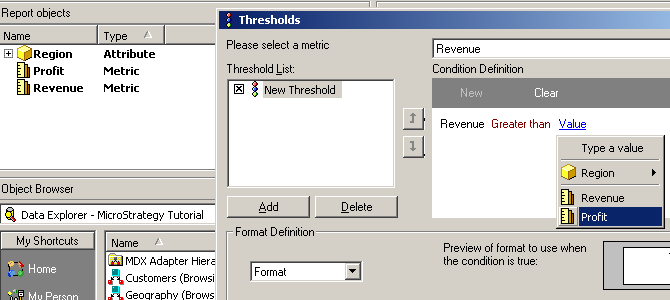
 

  • Create a report with the attribute Region on the rows and the Revenue and Profit metrics on the columns.
  • On the Report menu, go to Data > Thresholds. Add a new threshold with a condition Revenue 'Greater than' Profit. The threshold dialog box is as shown below:
ka02R000000kYeGQAU_0EM440000002FRO.jpeg
  • Now create a Report Services document and add the above created report as a data set.
  • On the Document menu, go to Format > Conditional Formatting. Add a new threshold with the 'Greater than' condition on Revenue. The Conditional Formatting dialog box is as shown below:
ka02R000000kYeGQAU_0EM440000002FRV.jpeg

Conditional formatting in Report Services documents only allows the user to type-in a comparison value unlike the options provided for thresholds in reports.
 
CAUSE:
This is a known issue in Strategy Developer.
 
ACTION:
Strategy will continue to investigate and post updates as soon as they are available.


Comment

0 comments

Details

Knowledge Article

Published:

June 6, 2017

Last Updated:

June 6, 2017