SYMPTOM
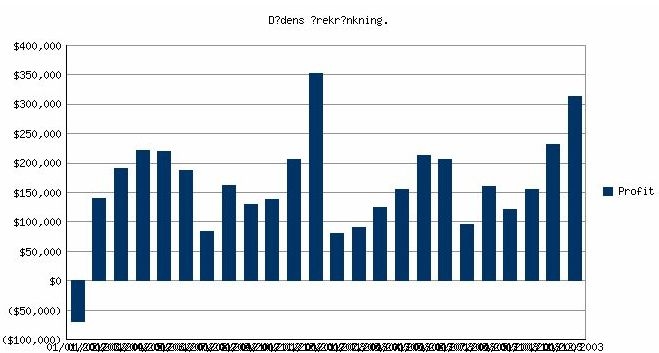
When executing a report with a graph in Strategy Web using Strategy Intelligence Server on Unix, special characters such as umlauts or symbols are not displayed and there is a question mark instead. The rotation of the labels in the graph also fails to work where it is needed and the user is left with unreadable labels.
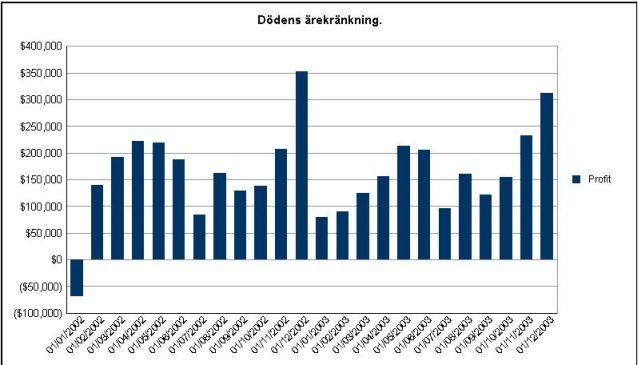
The following image shows a report executed in Strategy Developer
When executing the same report in Strategy Web, notice that any symbols or umlauts in the title have been converted to question marks and the labels are now rotated so they are unreadable:
CAUSE
These issues are caused by the lack of necessary fonts in the Strategy Intelligence Server installation on the Unix machine. For more information on this, refer to the following Strategy Knowledge Base technical notes:
KB9971: How to display non-English characters in Report Services documents, PDF exports and HTML documents with graphs in 3 and 4-tier and in 4-tier graphs with a Unix Intelligence Server
KB41194: How to install and use fonts for Reports/Documents/Dashboards for the Export Engine to PDF with Strategy Intelligence Server Universal 9.x-10.x on Unix/Linux
ACTION
In order for the graphs to display correctly, the Microsoft true type fonts used for the particular graphs must be installed in the folder 'PDFGeneratorFiles' within the Strategy installation path. Here is one example what this path may look like:
/home/pwilhel/MicroStrategy/install/PDFGeneratorFiles
Fonts are Intellectual Property and their usage may be restricted by license terms. Users are responsible for and must obtain appropriate licenses for any fonts that are to be used on Unix/Linux machines with Strategy. Users may reference the information at http://en.wikipedia.org/wiki/Core_fonts_for_the_Web which lists several sources for the Microsoft Core fonts package and also lists the licensing conditions governing the use of this package.
After the missing font files have been installed, Strategy Intelligence Server should be restarted to pick up the new fonts.
Third Party Software Installation:
WARNING:
The third-party product(s) discussed in this technical note is manufactured by vendors independent of Strategy. Strategy makes no warranty, express, implied or otherwise, regarding this product, including its performance or reliability.
KB14334
