EducationSoftwareStrategy.com
StrategyCommunity

Knowledge Base

Product

Community

Knowledge Base

TopicsBrowse ArticlesDeveloper Zone

Product

Download SoftwareProduct DocumentationSecurity Hub

Education

Tutorial VideosSolution GalleryEducation courses

Community

GuidelinesGrandmastersEvents
x_social-icon_white.svglinkedin_social-icon_white.svg
Strategy logoCommunity

© Strategy Inc. All Rights Reserved.

LegalTerms of UsePrivacy Policy
  1. Home
  2. Topics

KB14355: ‘MsiWorkingSet::GetDocMsgRslt(): GetDocRslt() returns error 0x80041FF2’ error appears in the DSSErrors log on MicroStrategy Intelligence Server when executing a large Report Services document in MicroStrategy Web


Community Admin

• Strategy


‘MsiWorkingSet::GetDocMsgRslt(): GetDocRslt() returns error 0x80041FF2’ error appears in the DSSErrors log

SYMPTOM:
Users executing large Report Services documents may see the following errors in the DSSErrors log on the Strategy Intelligence Server machine when the document fails:
 
2006-06-20 16:27:31.879-05:00 Strategy Intelligence Server cannot handle your request because a memory request has exceeded the configured limit. Please contact the server administrator.
2006-06-20 16:27:31.911-05:00 MsiWorkingSet::GetDocMsgRslt(): GetDocRslt() returns error 0x80041FF2
CAUSE:
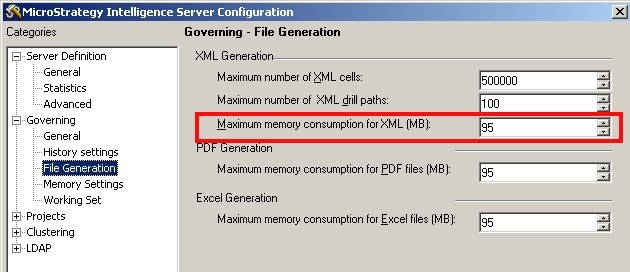
The error code 0x80041FF2 indicates that the Maximum Memory Consumption for XML generation has been exceeded. The XML generation is needed to send the results for the Report Services document to the Web server. If the result set is large enough, the memory governing setting may be exceeded.
 
ACTION:
Increase the governing setting for XML generation so that the document can be executed. This setting is available in the Strategy Intelligence Server Configuration in the File Generation tab, as shown below:
 

ka04W000000OheFQAS_0EM440000002BbV.jpeg


Comment

0 comments

Details

Knowledge Article

Published:

May 4, 2017

Last Updated:

May 4, 2017