EducationSoftwareStrategy.com
StrategyCommunity

Knowledge Base

Product

Community

Knowledge Base

TopicsBrowse ArticlesDeveloper Zone

Product

Download SoftwareProduct DocumentationSecurity Hub

Education

Tutorial VideosSolution GalleryEducation courses

Community

GuidelinesGrandmastersEvents
x_social-icon_white.svglinkedin_social-icon_white.svg
Strategy logoCommunity

© Strategy Inc. All Rights Reserved.

LegalTerms of UsePrivacy Policy
  1. Home
  2. Topics

KB14358: "The object specified by %1 is not found in the pool" error occurs when executing a Report Services Document in Web


Community Admin

• Strategy


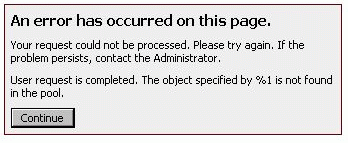
When users execute a Report Services Document in Web 9.x and 10.x, the following error occurs: An error has occurred on this page. Your request could not be processed. Please try again. If the problem persists, contact the Administrator. User request is completed. The object specified by %1 is not found in the pool.

Description


Sometimes, when users execute a Report Services Document in Web 9.x and 10.x, the following error occurs.
ka04W00000148BZQAY_0EM4400000028rQ.gif

An error has occurred on this page. Your request could not be processed. Please try again. If the problem persists, contact the Administrator. User request is completed. The object specified by %1 is not found in the pool.

Why is this happening?

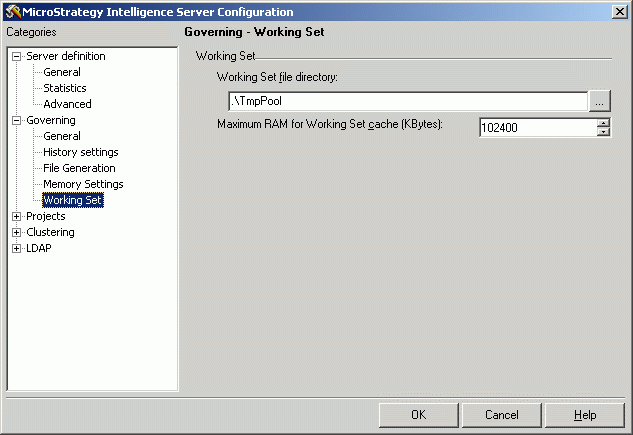
This error is related to the Maximum RAM for Working Set cache on Intelligence Server 9.x and 10.x, which is the governor that modulates the size of the Working Set Result Pool. ACTION To fix the error, it is necessary to increase the Working Set setting on Strategy Intelligence Server 9.x and 10.x.
The Default value is 102400 KB, as shown below:
ka04W00000148BZQAY_0EM4400000028rP.gif

Increasing this setting means that Strategy Intelligence Server may be operating with a higher average memory footprint during its lifecycle, so proper tuning may be needed if memory usage becomes an issue.
NOTE: This is a Strategy Intelligence Server configuration-level setting, so it applies to all the projects and all the users and is not specific to a project. If these settings are changed, The Intelligence Server needs to be restarted.

Learning Resources

Interested in learning more? Visit the Learning Center on Community!


Comment

0 comments

Details

Knowledge Article

Published:

March 29, 2017

Last Updated:

March 29, 2017